Data Visualization and Playback
Reads ubt_sim/dataset/{walker_s2,tienkung_pro,walker_c1,tienkung_dex}/<timestamp>/trajectory.hdf5 in two modes:
| Mode | Purpose | Dependency |
|---|---|---|
Preview (--mode preview) |
Inspect recorded camera images + joint/hand/gripper curves in Rerun; timeline scrub, frame stepping, and looping are built in | rerun-sdk (control Python) |
Control (--mode control) |
Replay recorded actions to simulation or hardware at the original rate | ROS 2 (rclpy + robot message packages) |
Entry scripts live in ubt_sim/teleoperation/tools/:
playback_walker_s2.py- Walker S2 EDU (17 body joints + 7+7 V4 hands + 2 grippers + 4 cameras)playback_tienkung_pro.py- Walker TienKung Pro (7+7 arms + 6+6 hands + 1 camera with depth)playback_walker_c1.py- Walker C1 EDU (31 body joints + 6+6 hands + 1 camera)playback_tienkung_dex.py- Walker TienKung Dex (right arm 7 + right hand 6/13 + 1 camera with depth)
Architecture: a shared core playback/common.py (HDF5 loading, pacing, CLI, Rerun preview) + robot adapters in playback/robots/ (schema + ROS 2 publishers + first-frame alignment), with thin entry scripts under tools/.
Environment (container)
# rerun-sdk is included in the Dockerfile control environment; install it in an old container without rebuilding:
# (pin 0.23.0: 0.24+ requires numpy>=2, conflicting with the container's numpy<2 constraint)
docker exec -it ubt-sim /usr/bin/python3 -m pip install "numpy<2" "rerun-sdk==0.23.0" -i https://pypi.tuna.tsinghua.edu.cn/simple

# Control mode additionally needs (Walker requires SDK messages; TienKung only needs ROS 2):
source /opt/ros/humble/setup.bash
source /opt/ubt_sim/walker_sdk_ros2_msgs/install/setup.bash   # Walker only

# Always use system Python:
/usr/bin/python3
Preview mode
⚠️ Use the web viewer (browser) inside the container: the native Rerun viewer is a wgpu/egui application, but the container only provides NVIDIA vendor GL (no Mesa, no Vulkan surface); wgpu cannot obtain an adapter and fails silently. The local pop-up mode only works on hosts with a working GL/Vulkan window environment.
cd /ubt_sim

# ① Browser preview (recommended, works in the container)
python3 teleoperation/tools/playback_walker_s2.py \
    --episode dataset/walker_s2/1786681892 --mode preview --web-port 9090

# ② Save .rrd (no viewer) and open it with a rerun viewer on the host
python3 teleoperation/tools/playback_walker_s2.py \
    --episode dataset/walker_s2/1786681892 --mode preview --save-rrd /tmp/walker_ep.rrd

# ③ Local pop-up (only with a GPU window environment: run directly on a workstation/host)
python3 teleoperation/tools/playback_walker_s2.py \
    --episode dataset/walker_s2/1786681892 --mode preview
- For other robots, switch to
playback_tienkung_pro.py/playback_walker_c1.py/playback_tienkung_dex.py. - After starting the web viewer, the script prints the full URL (like
http://localhost:9090/?url=rerun%2Bhttp%3A%2F%2F127.0.0.1%3A9876%2Fproxy); open it as printed. ⚠️ The trailing?url=parameter is the data source and must not be omitted. For a remote browser, forward both ports 9090 and 9876 (ssh -L 9090:localhost:9090 -L 9876:localhost:9876). --episodedefaults to the newest episode underdataset/<robot>/(largest timestamp directory);--max-frames Nrecords only the first N frames.- Rerun panels:
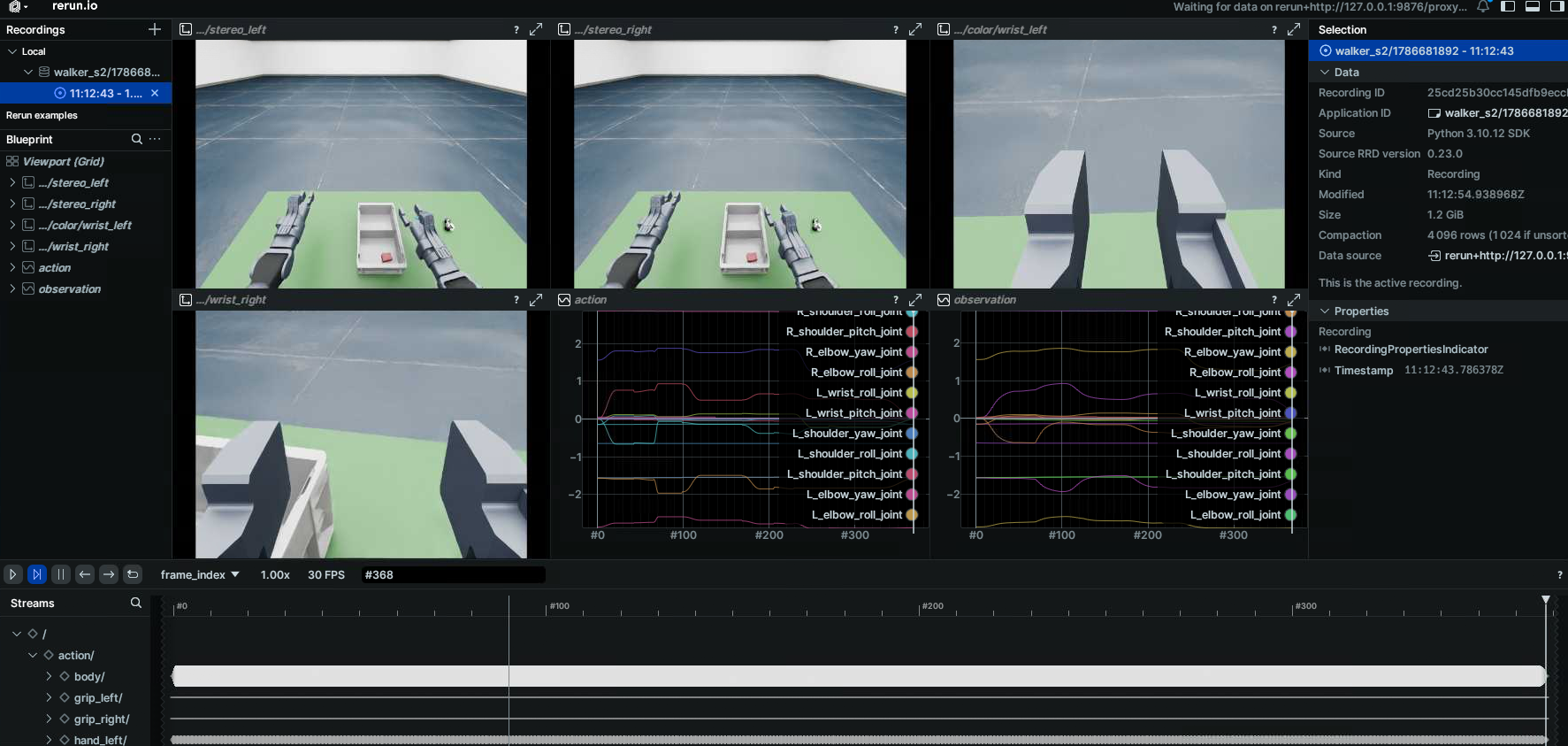
cameras/color/<camera>(images),cameras/depth/...(TienKung depth),action/<group>/<channel>(command curves),observation|puppet/...(observation curves), all synchronized on theframe_index/timestamptimelines.
Control mode
Playback sends the raw recorded frame values (most faithful). Published ROS 2 topics:
- Walker S2 EDU: 17 joints
RobotCommand(MODE_POSITION)@/mc/sdk/robot_command+ both handsJointCommand(mode=5)+ both grippersGripCmd - Walker TienKung Pro:
CmdSetMotorPosition(14 motors) @/arm/cmd_pos+ both handsJointState - Walker C1 EDU:
RobotCommand(MODE_POSITION)@/mc/sdk/robot_command+ both handsJointCommand(mode=5) - Walker TienKung Dex:
ArmCtrl@/arm/cmd(+/head/cmd,/waist/cmd) + right handangle_set/set_motor_multi(per hand variant)
Simulation (via the bridge) and hardware use exactly the same topics; one script works for both, only ROS_DOMAIN_ID differs.
# Always start with a dry run (no ROS 2 init, no publishing, just per-frame summaries)
python3 teleoperation/tools/playback_walker_s2.py \
    --episode dataset/walker_s2/1786681892 --mode control --dry-run --end 3

# Playback (same command for simulation and hardware; distinguish by ROS_DOMAIN_ID: hardware 0 / simulation 146, verify locally)
# Simulation: start simulation + bridge with start_sim.sh first, and confirm $ROS_DOMAIN_ID matches the bridge
python3 teleoperation/tools/playback_walker_s2.py \
    --episode dataset/walker_s2/1786681892 --mode control --align-first --end 200

# Hardware: set ROS_DOMAIN_ID=0 and run the same command
ROS_DOMAIN_ID=0 python3 teleoperation/tools/playback_tienkung_pro.py \
    --episode dataset/tienkung_pro/1786638182 --mode control --align-first
Common arguments (--help shows all):
| Argument | Default | Description |
|---|---|---|
--start/--end |
0/last frame |
Frame index or "5s" (5th second); --end is exclusive |
--rate |
Dataset fps | Publish rate (Walker simulation bridge body limit is 100 Hz; >100 is silently rate-limited) |
--loop |
Off | Loop until Ctrl-C |
--align-first |
Off | Smoothly move to the first-frame pose before playback (Walker: 3 s quintic interpolation; TienKung: ~2 s joint-space ramp) |
--dry-run |
Off | Print only, do not publish |
--interp |
Off | [Walker] Linearly interpolate between recorded frames to --rate (smoother, deviates from the recording) |
--spd/--cur |
0.2/5.0 |
[TienKung] Default motor speed/current |
--arm-clamp-lo/hi |
±2.5 |
[TienKung] Arm limits (teleoperation has no arm limit constants; conservative assumption) |
Safety notes
- Limit clipping is enabled by default (Walker uses the hardware limit table; TienKung uses hand [0,1] and conservative arm limits); data containing NaN/inf is rejected.
--align-firstaligns the first-frame pose before playback, avoiding a jump from an arbitrary current pose.- After Ctrl-C the robot holds the last command (simulation uses HoldTargetManager; hardware must be reset manually).
- Always run
--dry-runfirst, confirmROS_DOMAIN_IDmatches the target, and place the robot in a safe position.