Walker S2 EDU Real-Robot Workflow: Collect -> Convert -> Train -> Evaluate -> Deploy
Complete closed loop for real-robot collection -> Walker S2 EDU deployment: real collection -> data conversion -> training -> evaluation -> real deployment. Code:
ubt_IL/scripts/{convert,train,deploy}/walker_s2/.
Contents
- 0. Workflow overview
- 1. Prerequisite: real-robot data collection
- 2. Start the container
- 3. Data conversion (HDF5 -> LeRobot)
- 3.1 Conversion command
- 3.2 Data visualization
- 4. Policy training
- 5. Policy evaluation (offline MSE)
- 6. Model deployment (real robot)
- 6.1 Inference deployment
- 6.2 Inference server (warm start/external calls)
- 7. FAQ
0. Workflow overview
A[Real-robot teleoperation] --> B[HDF5 conversion] --> C[Model training] --> D[Offline MSE] --> E[Real deployment / inference server] --> F[Task validation]
1. Prerequisite: real-robot data collection
Data is currently collected with the Thinker Studio teleoperation platform (see the official documentation), which can export LeRobot v3.0 datasets directly. You can also place collected real-robot HDF5 data under /ubt_IL/dataset/hdf5/ (or any SRC_ROOT) and proceed to conversion.
2. Start the container
Training/conversion/deployment all run in the lerobot-tienkung container:
cd ubt_IL/docker

# ⚠️ Must be checked before building: edit interfaceWhiteList in ubt_IL/docker/fastdds_no_shm.xml
# and set <address> to 192.168.11.99 (Walker S2 direct-link subnet). The file is copied into the image
# at build time; changes after the build have no effect.
bash run.sh build      # first time
bash run.sh start
bash run.sh bash       # enter the container; run conversion/training/evaluation there
The container has two Python environments: use
/usr/bin/python3for ROS and/lerobot/.venv/bin/python(default) for LeRobot. For real deployment, the container is built on the robot Jetson board; the build script detects the board and builds the corresponding ARM container.
3. Data conversion (HDF5 -> LeRobot)
3.1 Conversion command
Script: ubt_IL/scripts/convert/walker_s2/convert.sh
Core converter: ubt_IL/scripts/convert/common/convert_to_lerobot.py
Configs: /ubt_IL/scripts/convert/walker_s2/configs/; choose or adapt one for your training needs.
Real-robot 10D example (right arm + head + right gripper, 2 RGB):
CONFIG=/ubt_IL/scripts/convert/walker_s2/configs/walker_s2_real_10d_2RGB.json \
SRC_ROOT=/ubt_IL/dataset/walker-s2-pick-part-real-hdf5 \
TGT_PATH=/ubt_IL/dataset \
REPO_ID=Walker_S2_pick_part_real_10_2RGB \
TASK_NAME=walker_s2_pick_part \
bash /ubt_IL/scripts/convert/walker_s2/convert.sh

# Stationary-trimmed variant (removes grasp-waiting stationary segments to avoid local stationary loops)
TRIM_STATIONARY=1 \
CONFIG=/ubt_IL/scripts/convert/walker_s2/configs/walker_s2_real_10d_2RGB.json \
SRC_ROOT=/ubt_IL/dataset/walker-s2-pick-part-real-hdf5 \
TGT_PATH=/ubt_IL/dataset \
REPO_ID=Walker_S2_pick_part_real_10_2RGB \
TASK_NAME=walker_s2_pick_part \
bash /ubt_IL/scripts/convert/walker_s2/convert.sh
Environment variables
| Variable | Default | Description |
|---|---|---|
SRC_ROOT |
/ubt_IL/dataset/walker-s2-real-data |
HDF5 source directory (default real-data location) |
TGT_PATH |
/ubt_IL/dataset |
LeRobot output root |
CONFIG |
configs/walker_s2_real_19d_1RGBD.json |
Conversion config (the default file is not in the repository; always specify an existing config) |
REPO_ID |
Walker_S2_real_19_1RGBD |
Output dataset repo_id (local directory name + HF repo name) |
ROBOT_TYPE |
walker_s2 |
Robot type (written to metadata) |
TASK_NAME |
walker_s2_real |
Task name (written to metadata) |
FPS |
15 |
Dataset frame rate (auto uses the source HDF5 rate) |
VCODEC |
h264 |
Video codec (h264/jpeg/png) |
HDF5_REL_PATH |
hdf5/metadata_aligned.hdf5 |
Source HDF5 relative path |
RESAMPLE_FPS |
Empty | Resample to the target rate when set |
LABEL_ROOT |
Empty | Label root (used when task labels exist) |
TRIM_STATIONARY |
Empty | Trim stationary frames when set (--trim-stationary) |
STATIONARY_KEY |
action |
Key used for stationary detection |
STATIONARY_WINDOW |
Auto (0.3 × fps) |
Stationary detection window |
STATIONARY_THRESH |
0.03 |
Stationary detection threshold |
STATIONARY_CAP |
8 |
Maximum consecutive stationary frames |
STATIONARY_MIN_RUN |
3 |
Minimum valid run length |
STATIONARY_RANGE_EPS |
1e-3 |
Stationary interval tolerance |
Pass-through options:
--overwritereplaces an existing dataset;--save_one trueuses single-file mode.
3.2 Data visualization
After conversion, inspect the dataset with the LeRobot visualizer:
# Inside the container:
HF_HUB_OFFLINE=1 lerobot-dataset-viz \
  --repo-id <dataset name> \
  --episode-index 0 \
  --root /ubt_IL/dataset/<dataset name>
Example:
# Visualize the dataset converted in section 3.1
HF_HUB_OFFLINE=1 lerobot-dataset-viz \
  --repo-id Walker_S2_real_10_2RGB \
  --episode-index 0 \
  --root /ubt_IL/dataset/Walker_S2_real_10_2RGB
Preview:
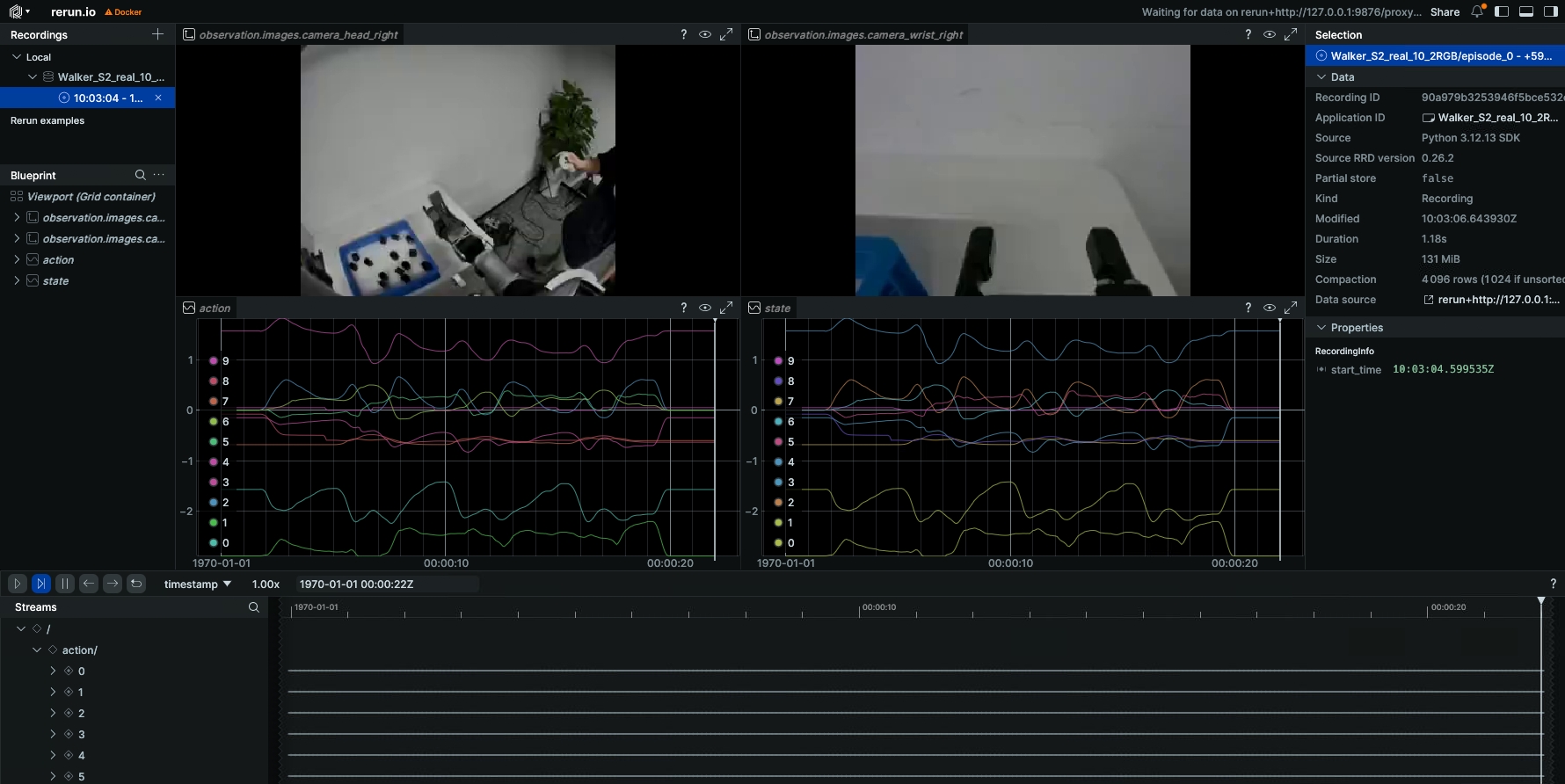
Check especially: image resolution, state/action dimension and order, grip range, and empty episodes.
4. Policy training
Training script: /ubt_IL/scripts/train/walker_s2/train.sh
Configs: /ubt_IL/scripts/train/walker_s2/configs/; choose or adapt one for your training needs.
# Specify the real-robot training config explicitly, or override common parameters.
# Single-part policy: use the pick_part config + matching dataset.
CONFIG=/ubt_IL/scripts/train/walker_s2/configs/train_config_pick_part_real_10d_2RGB.json \
DATASET_REPO_ID=Wlaker_Pick_part_real_10d_2RGB \
OUTPUT_DIR=/ubt_IL/model/Wlaker_Pick_part_real_10d_2RGB_act \
STEPS=50000 SAVE_FREQ=5000 BATCH_SIZE=8 \
bash /ubt_IL/scripts/train/walker_s2/train.sh

# Resume (CONFIG points to train_config.json inside the checkpoint)
CONFIG=/ubt_IL/model/Wlaker_Pick_part_real_10d_2RGB_act/checkpoints/last/pretrained_model/train_config.json \
RESUME=true \
bash /ubt_IL/scripts/train/walker_s2/train.sh
Without train.sh (call lerobot-train directly with --xxx=yyy overrides; run from /ubt_IL/lerobot):
# Train from scratch
cd /ubt_IL/lerobot
HF_HUB_OFFLINE=1 /lerobot/.venv/bin/lerobot-train \
  --config_path=/ubt_IL/scripts/train/walker_s2/configs/train_config_pick_part_real_10d_2RGB.json \
  --output_dir=/ubt_IL/model/Wlaker_Pick_part_real_10d_2RGB_act \
  --steps=50000 --save_freq=5000 --batch_size=8

# Resume
HF_HUB_OFFLINE=1 /lerobot/.venv/bin/lerobot-train \
  --config_path=/ubt_IL/model/Wlaker_Pick_part_real_10d_2RGB_act/checkpoints/last/pretrained_model/train_config.json \
  --resume=true
Overrides
| Variable | Default | Description |
|---|---|---|
CONFIG |
$SCRIPT_DIR/configs/train_config_walker_s2_sim_act_10_2RGB.json |
Training config JSON (defaults to the simulation config; specify a real config such as train_config_pick_part_real_10d_2RGB.json) |
DATASET_REPO_ID |
From config | Dataset repo_id |
DATASET_ROOT |
From config | Dataset root |
OUTPUT_DIR |
From config | Model output directory |
STEPS |
From config | Total training steps |
SAVE_FREQ |
From config | Checkpoint save frequency |
BATCH_SIZE |
From config | Batch size |
SEED |
From config | Random seed |
DEVICE |
From config | Training device (cuda/cpu) |
RESUME |
false |
true resumes from the checkpoint |
WANDB_ENABLE |
false |
wandb logging switch |
HF_HUB_OFFLINE=1is enabled by default (offline training). Environment variables override config values only when explicitly set.
5. Policy evaluation (offline MSE)
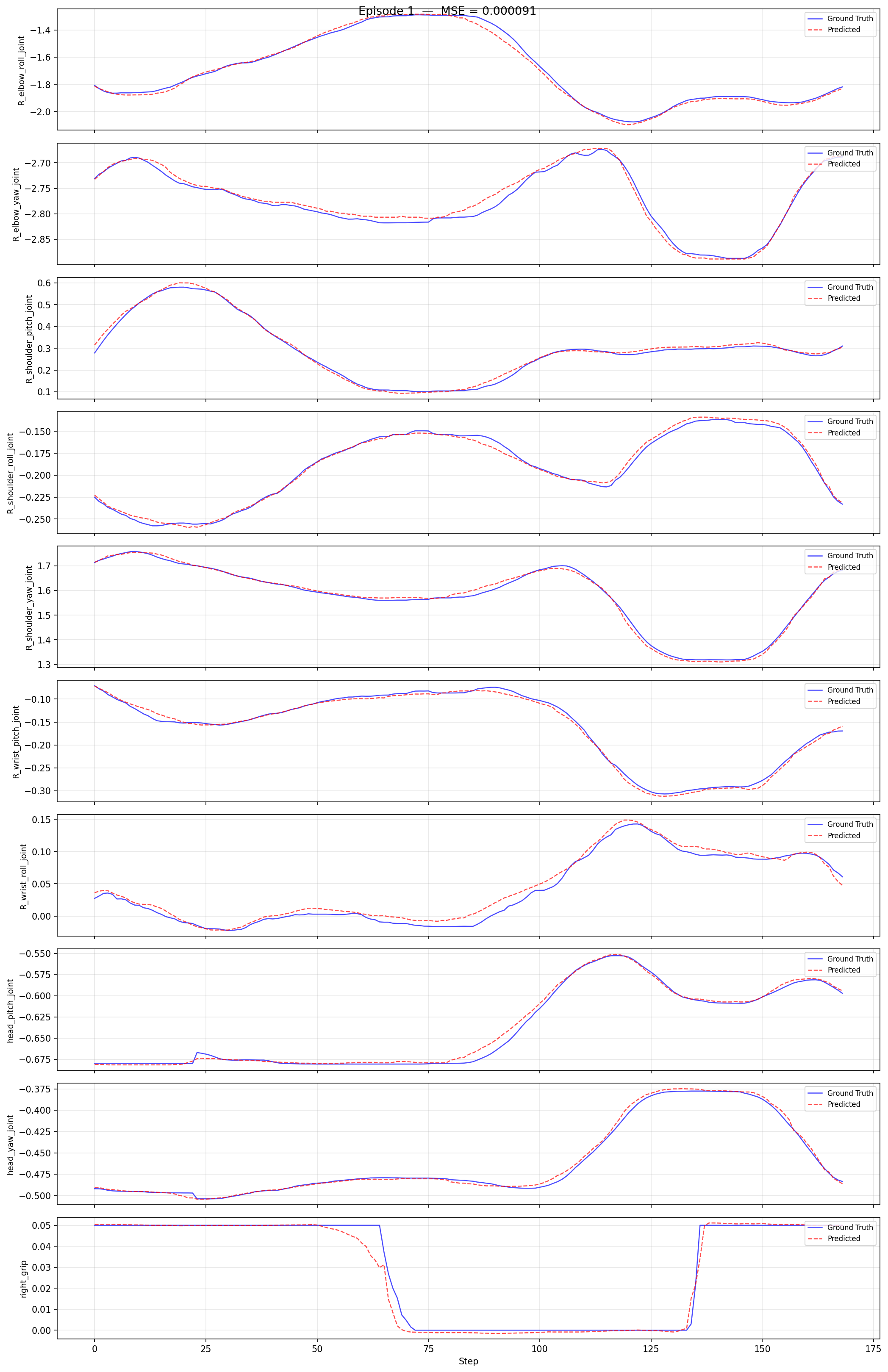
Runs offline MSE evaluation (prediction vs ground truth) on a LeRobot dataset without connecting to the robot and generates per-episode comparison plots.
Script (shared with TienKung): ubt_IL/scripts/eval/eval_policy.py.
Example:
cd /ubt_IL/lerobot

/lerobot/.venv/bin/python /ubt_IL/scripts/eval/eval_policy.py \
  --policy-path /ubt_IL/model/walker_pick_part_real_10d_2RGB_act/checkpoints/080000/pretrained_model \
  --dataset-path /ubt_IL/dataset/Wlaker_Pick_part_real_10d_2RGB \
  --episodes 10 \
  --inference-freq 1 \
  --plot \
  --plot-dir /ubt_IL/scripts/eval/output/eval_walker_pick_part_real_10d_2RGB_act \
  --output /ubt_IL/scripts/eval/output/eval_walker_pick_part_real_10d_2RGB_act/results.json \
  --device cuda
Preview:
| Argument | Description |
|---|---|
--policy-path |
pretrained_model directory (containing config.json + model.safetensors) |
--dataset-path |
LeRobot dataset root (containing meta/info.json) |
--episodes |
Number of episodes to evaluate (default: all) |
--inference-freq |
Run inference every N steps and reuse the predicted chunk in between (emulates real deployment; 1 = every step) |
--plot / --plot-dir |
Per-episode prediction-vs-ground-truth plots and output directory |
--output |
Result JSON path |
--device |
cuda or cpu (default cuda, falls back automatically) |
6. Model deployment (real robot)
Prerequisites:
- The robot is powered, standing, and in developer mode.
- Sequence: power on, enable servos and press D to start internal motion control -> place the robot on the ground, hold A to enter standing mode. See the Walker S2 EDU development guide for remote details.
- Walker real deployment runs on the robot Vision board; copy the project and model to the board, then build and start the container.
6.1 Inference deployment
Script: ubt_IL/scripts/deploy/walker_s2/rollout.sh.
Deployment steps:
# 0. Enter developer mode -- ubt container on the robot Vision board
ssh -p 2222 ubt@192.168.11.2/3  # password: Ubtubt@9880
# Request developer mode: true to enter, false to exit
ros2 service call /sys/task/developer_mode std_srvs/srv/SetBool "{data: true}"
# true = developer mode, false = normal mode
ros2 topic echo /sys/state/walker_mode

# 1. Build and start the inference container -- robot Vision board
# 1.1 Copy the project to the Vision board
scp project-code-and-models /home/walker/
# 1.2 Log in to the Vision board and build the container
ssh walker@192.168.11.3 # password: aa
cd project-path/ubt_IL/docker
# ⚠️ Must be checked before building: edit interfaceWhiteList in fastdds_no_shm.xml
# and set <address> to 192.168.11.99 (Walker S2 direct-link subnet); the file is copied at build time.
bash run.sh build
# 1.3 Start the container
bash run.sh start
bash run.sh bash

# 2. Initialize the pose (raise the arm above the table)
bash /ubt_IL/scripts/deploy/walker_s2/robot_ready.sh

# 3. Deploy the real-robot 10D model with asynchronous inference
ROBOT_MODEL=walker_s2_10d \
POLICY_PATH=/ubt_IL/model/walker_pick_part_real_10d_2RGB_act/checkpoints/080000/pretrained_model \
INFERENCE_TYPE=act_async INFERENCE_HZ=1 \
FPS=13 DURATION=60 \
bash /ubt_IL/scripts/deploy/walker_s2/rollout.sh

# (Optional) Verify the camera path; specify camera topic/robot config
/usr/bin/python3 scripts/deploy/walker_s2/preview_camera.py --robot walker_s2_10d
Demo (real-robot deployment):
Environment variables
| Variable | Default | Description |
|---|---|---|
POLICY_PATH |
Required, no default | Checkpoint directory (containing config.json) |
ROBOT_MODEL |
walker_s2_31d |
ROBOT_MODELS registry key (see below) |
ROBOT_CONFIG |
configs/<ROBOT_MODEL>.json |
Full path to the robot config (override for custom configs) |
ALLOW_DIM_ONLY_POLICY |
1 |
Allow dimension-only matching when the policy has no action names |
STRATEGY |
base |
Rollout strategy |
FPS |
13 |
Control rate |
DURATION |
30 |
Run time (seconds) |
TASK |
walker s2 rollout |
Task description |
PREVIEW_CAMERA |
1 |
Show the camera preview window |
RECORD_ACTIONS |
1 |
Record rollout actions (RECORD_OUTPUT_DIR sets the output) |
INFERENCE_TYPE |
sync |
Inference engine (sync / act_async) |
INFERENCE_HZ |
0.6 |
act_async replanning rate |
EXECUTION_HORIZON |
0 |
Truncate chunks after N steps (0 = no truncation) |
ZMQ_HOST |
127.0.0.1 |
Bridge address (keep default when Bridge2 is on the same host; use the robot IP for cross-machine deployment) |
Online evaluation (recording inference trajectories)
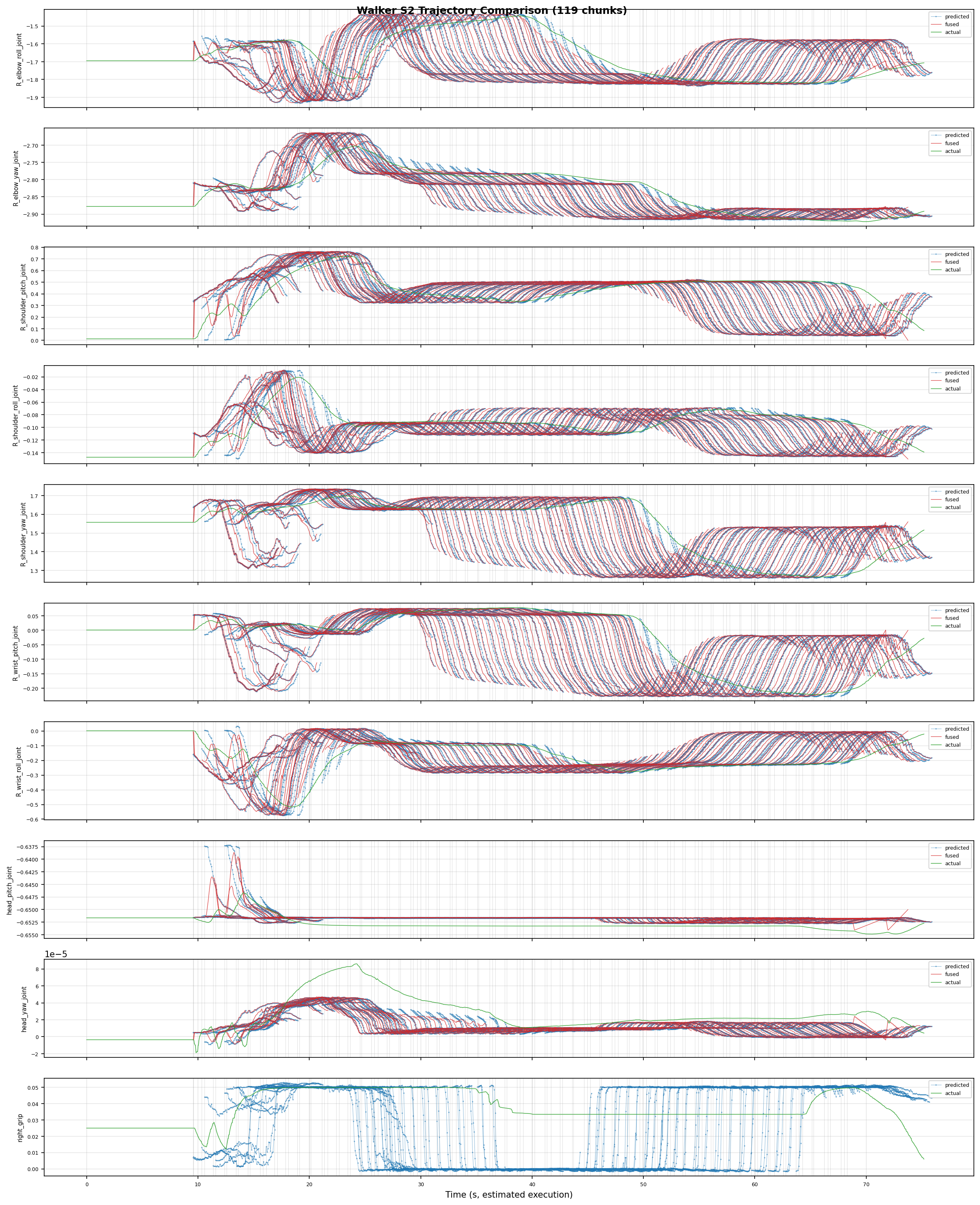
Set RECORD_ACTIONS=1 during deployment to record rollout actions for analyzing model predictions, robot execution, and ACT blending. Records are saved under ubt_IL/scripts/deploy/output.
Robot configuration (ROBOT_MODELS registry)
| Registry key | Dimension | End effector | Config file |
|---|---|---|---|
walker_s2_10d |
10D (right arm 7 + head 2 + right gripper 1) | PGC right gripper | walker_s2_gripper_19d.json (10D is a subset) |
walker_s2_19d |
19D (17 body + 2 grippers) | PGC 1-DOF gripper | walker_s2_gripper_19d.json |
walker_s2_31d |
31D (17 body + 14 hands) | V4 dexterous hand 7 DOF | walker_s2_v4_hand_31d.json |
6.2 Inference server (warm start/external calls)
Inference server script: ubt_IL/scripts/deploy/walker_s2/inference_server.sh
Client script: ubt_IL/scripts/deploy/walker_s2/inference_client.sh
rollout.sh pays a long cold start on every run (policy load to CUDA + bridge startup). The inference server stays resident and pre-warmed; external clients use ZMQ commands start/stop/home/status/shutdown and can load models for hot-swapping VLA tasks and other tasks such as navigation or box carrying. See Inference server.
✅ Verified on hardware (2026-08-09): pre-warm to READY in ~6 s;
start-> RUNNING;stop/home(no jitter) /shutdownall pass.
# 1. Start the service (inside the container; pre-warms in the background to READY; the engine is paused and the robot does not move)
cd /ubt_IL/scripts/deploy/walker_s2
ROBOT_MODEL=walker_s2_10d \
POLICY_PATH=/ubt_IL/model/walker_pick_part_real_10d_2RGB_act/checkpoints/080000/pretrained_model \
INFERENCE_TYPE=act_async INFERENCE_HZ=1 FPS=15 \
bash inference_server.sh

# 2. Check whether the service is READY; if false, wait and query again
bash inference_client.sh status

# 3. Start / stop inference (moves the robot!)
bash inference_client.sh start
bash inference_client.sh stop

# 4. Return home / shut down (both return to home_position)
bash inference_client.sh home
bash inference_client.sh shutdown
start/home/shutdownmove the robot; execute them next to the robot.
Remote launch (load a model with explicit parameters)
Launch remotely from another machine (SSH + docker exec on the Jetson running the container, polling until READY):
cd /ubt_IL/scripts/deploy/walker_s2
bash inference_client.sh launch \
  --policy-path /ubt_IL/model/walker_pick_part_real_10d_2RGB_act/checkpoints/080000/pretrained_model \
  --robot-model walker_s2_10d --inference-hz 2 --fps 13 \
  --remote --host 192.168.11.3 --ssh-user walker
Know the two machines: - Jetson
192.168.11.3(SSHwalker, port 22/2222): runs thelerobot-tienkungcontainer and inference. This is the--hostforlaunch --remote. - Robot control PC192.168.11.2(SSHubt, port 2222):dev_mode.shdeveloper mode / ROS 2. It does not run the inference container; do not use it as--host.
Client commands
bash inference_client.sh status                       # query state (state/model/loop_hz/chunk_id/...)
bash inference_client.sh start                        # start inference (engine reset+resume -> RUNNING)
bash inference_client.sh stop                         # stop inference (engine pause -> READY, hold current pose)
bash inference_client.sh home                         # return to home_position (pause, then smooth chunk)
bash inference_client.sh load --policy-path /ubt_IL/model/<other>/.../pretrained_model --robot-model walker_s2_10d
                                                       # hot-swap the model while running (full rebuild incl. reconnect)
bash inference_client.sh shutdown                     # shut down (home + kill bridge + exit)
bash inference_client.sh watch                        # subscribe to the status PUB stream (Ctrl-C to exit)
Environment variables (inference_server.sh)
| Variable | Default | Description |
|---|---|---|
POLICY_PATH |
Required | pretrained_model directory |
ROBOT_MODEL |
walker_s2_31d |
ROBOT_MODELS registry key |
ROBOT_CONFIG |
Empty | Custom robot config JSON (overrides ROBOT_MODEL) |
INFERENCE_TYPE |
act_async |
Inference engine (start/stop require act_async) |
INFERENCE_HZ |
0.6 |
act_async replanning rate |
EXECUTION_HORIZON |
0 |
Truncate chunks after N steps |
FPS |
13 |
Control loop FPS |
BLEND_HORIZON |
10 |
Bridge chunk blending overlap points |
BODY_PUBLISH_HZ |
300 |
Bridge 300 Hz body publish rate |
BODY_V_MAX |
2.0 |
Bridge rate-limit maximum joint velocity |
SERVER_CMD_PORT |
5570 |
ZMQ REP command port |
SERVER_STATUS_PORT |
5571 |
ZMQ PUB status port |
PREVIEW_CAMERA |
0 |
Server does not open the preview window by default |
Singleton:
/tmp/walker_inference_server.pid; a second launch is refused while it exists. Log:/tmp/walker_inference_server.log. State machine:LOADING(warm-up/rebuild) ->READY(idle) ⇄RUNNING(executing);home->RETURNING_HOME->READY.
7. FAQ
| Problem | Cause / fix |
|---|---|
| Conversion reports "config does not exist" | The convert.sh default CONFIG=configs/walker_s2_real_19d_1RGBD.json is not in the repository; specify an existing config (walker_s2_real_10d_2RGB.json) |
| Real-robot 19D data cannot be converted | The repository only provides a 10D real config; write walker_s2_real_19d_*.json based on the joint order in walker_s2_gripper_19d.json |
| Dataset frame rate differs from expected | Collection runs at 15 Hz and conversion defaults to FPS=15; use FPS=auto for the source rate or RESAMPLE_FPS to resample |
| Deployment reports a dimension mismatch | Safety precheck refused: policy output_features.action.shape[0] does not match robot config action_order. Match ROBOT_MODEL to the policy dimension (10D -> walker_s2_10d, 19D -> walker_s2_19d, 31D -> walker_s2_31d); policies without action names need ALLOW_DIM_ONLY_POLICY=1 |
Inference server start fails |
start/stop rely on act_async pause/resume; the sync engine has no such semantics, so use INFERENCE_TYPE=act_async |
launch --remote fails |
Confirm --host is the Jetson 192.168.11.3 (SSH walker), not the control PC; the SSH user needs sudo docker exec permission |
| Robot does not move during deployment | Confirm Bridge2 is running (5561/5562/5563), dev_mode.sh has switched to developer mode, and status shows the bridge connected |
| Repeated inference server launch fails | The singleton PID file /tmp/walker_inference_server.pid exists; shutdown cleanly or remove it manually |