Walker C1 EDU: Imitation Learning Platform¶
Code:
ubt_IL/scripts/{convert,train,eval,deploy}/walker_c1/(run inside the container) Prerequisite: repository cloned and submodules initialized as described in Getting Started; HDF5 data ready (simulation collection or real-robot collection)
This page documents the shared conversion/training/evaluation/deployment workflow and configuration parameters for Walker C1 EDU. Data-source-specific commands are embedded in the corresponding workflow pages.
1. Environment (ubt_IL container)¶
See Imitation Learning Platform · Container Setup for build / start / check / bash.
- The host project is mounted at
/ubt_IL;entrypoint.shinstallslerobotandlerobot_robot_walker_c1(editable) and builds/loadsmc_task_msgs/mc_state_msgs(reusing thewalker_s2/walker_sdk_ros2workspace). - Communication: LeRobot (Python 3.12) —ZMQ
5661/5662—> Bridge2 (system Python 3.10) —ROS 2 DDS—> robot/simulator. Images go throughwalker_c1_camera_relay.pyover ZMQ5663. - Thor (C1 onboard compute) is detected by
docker/run.sh, which switches toDockerfile.thor(L4T r38 / sm_110). Do not use the OrinDockerfile.arm64. bash run.sh checkshould report[OK] walker_c1 plugin/[OK] walker_c1 bridge/[OK] walker ROS2 msgs/[OK] torch; the RMW line is[INFO].- If the plugin is missing, reinstall it manually:
python /ubt_IL/walker_c1/init_walker_c1.py(expectsRobot type: walker_c1/Camera type: walker_c1_camera).
2. Data conversion (HDF5 -> LeRobot)¶
Script: /ubt_IL/scripts/convert/walker_c1/convert.sh (shared converter convert/common/convert_to_lerobot.py). It converts raw HDF5 data into a LeRobot v3 dataset at /ubt_IL/dataset/<REPO_ID>/.
Conversion command:
DIM=26 \
CONFIG=/ubt_IL/scripts/convert/walker_c1/configs/walker_c1_sim_26d_1RGB.json \
SRC_ROOT=/ubt_IL/dataset/walker_c1 \
TGT_PATH=/ubt_IL/dataset \
REPO_ID=walker_c1_sim_26d_1RGB \
TASK_NAME=walker_c1_sim_pick_place \
bash /ubt_IL/scripts/convert/walker_c1/convert.sh --overwrite
Examples:
- Simulation data: Simulation workflow · Data conversion
- Real-robot data: Real-robot workflow · Data conversion
Conversion configs in /ubt_IL/scripts/convert/walker_c1/configs/:
| Config | Dimension | Image | Scenario |
|---|---|---|---|
walker_c1_sim_26d_1RGB.json |
26D (both arms 14 + both hands 12) | 3×240×320 | Simulation (default, DIM=26) |
walker_c1_sim_13d_1RGB.json |
13D (right arm 7 + right hand 6) | 3×240×320 | Simulation, single-arm task (DIM=13) |
walker_c1_real_26d_1RGB.json |
26D | 3×512×640 | Real robot |
walker_c1_real_13d_1RGB.json |
13D | 3×512×640 | Real robot (verified, 30 fps) |
Common environment variables (defaults can be omitted; see bash convert.sh -h and Data Conversion):
| Variable | Description |
|---|---|
SRC_ROOT |
HDF5 root (default /ubt_IL/dataset/walker_c1; falls back to /ubt_sim/dataset/walker_c1 if absent) |
TGT_PATH |
LeRobot output root (default /ubt_IL/dataset) |
CONFIG |
Conversion config JSON (defaults to a sim config based on DIM) |
DIM |
26 (default) / 13; determines the default CONFIG and REPO_ID |
REPO_ID |
Output dataset name (default walker_c1_sim_<DIM>d_1RGB; keep it consistent with training) |
TASK_NAME |
Task name (default walker_c1_sim_pick_place, written to each frame's task field) |
FPS |
Target frame rate (default 15; use FPS=30 for 30 fps real-robot data) |
ROBOT_TYPE |
Robot type (default walker_c1, written to metadata) |
VCODEC |
Video codec (default h264) |
HDF5_REL_PATH |
HDF5 path relative to each episode directory (default trajectory.hdf5) |
TAIL_TRIM |
Drop N frames from the end of each episode (default 10). C1 ends with a fast release → retreat → ready reset; without trimming, the policy learns to fling the arm after finishing the task. |
TRIM_STATIONARY |
1 enables stationary-frame trimming (see below) |
STATIONARY_DIAGNOSE |
1 only reports the stationary distribution without writing data (for threshold calibration) |
RESAMPLE_FPS |
Target frame rate; enables resampling when set (disabled by default) |
Stationary-frame trimming
Stationary frames in a dataset can trap the policy in a local stationary loop. Set TRIM_STATIONARY=1 to trim stationary runs longer than the cap (default 8 frames). Prefix the conversion command with TRIM_STATIONARY=1 \.
Output: a LeRobot v3 dataset under /ubt_IL/dataset/<REPO_ID>/ (meta/, chunk-000/ data parquet, videos/).
3. Data visualization¶
After conversion, inspect dataset quality with lerobot-dataset-viz. Checking data before training is important to avoid training on bad data:
HF_HUB_OFFLINE=1 lerobot-dataset-viz \
  --repo-id <REPO_ID> \
  --episode-index 0 \
  --root /ubt_IL/dataset/<REPO_ID>
Note:
--rootmust point to the dataset directory containingmeta/(therepo_iddirectory itself), not its parent.HF_HUB_OFFLINE=1disables access to the HuggingFace Hub.
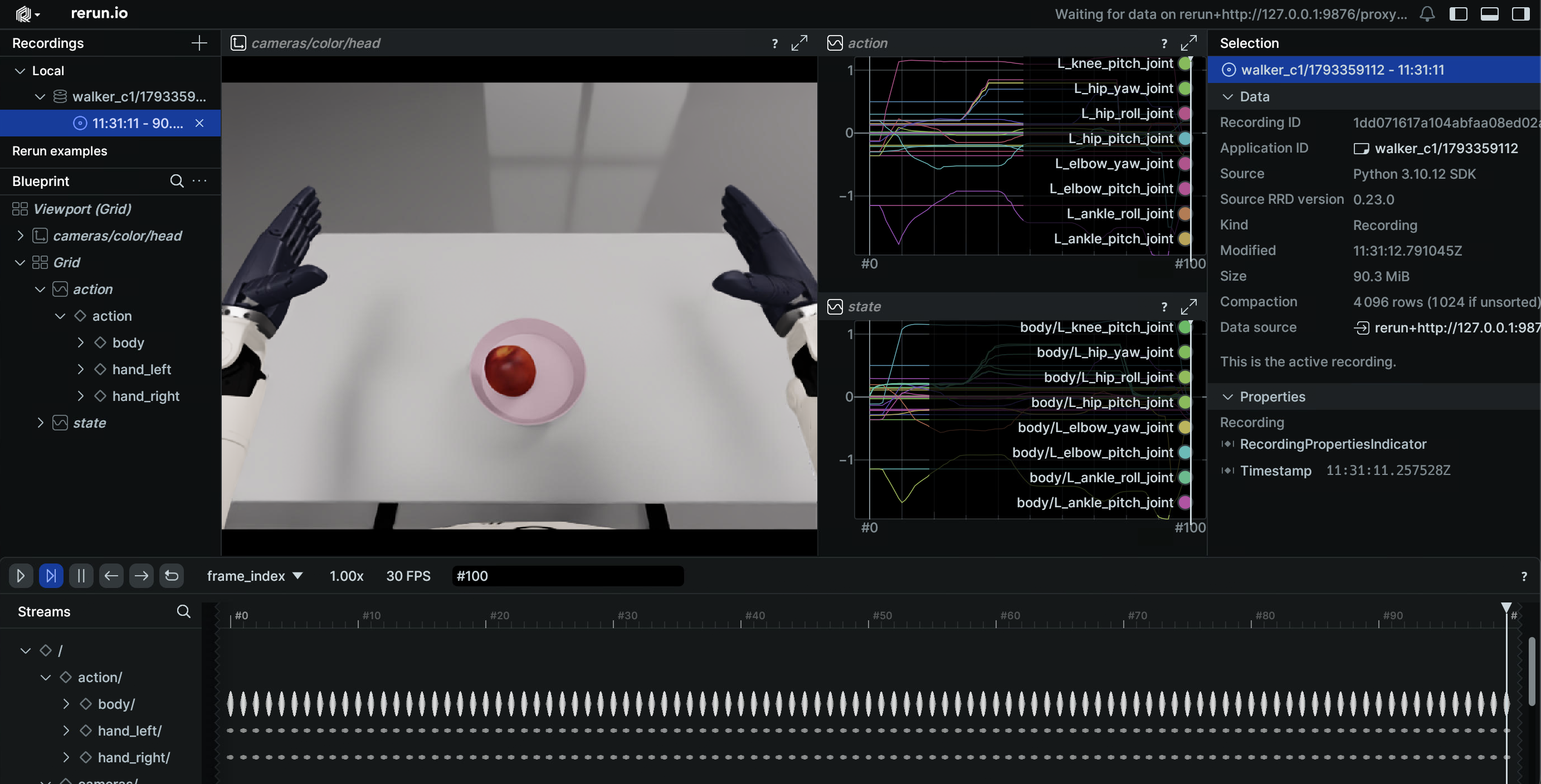
Examples: Simulation workflow · Visualization / Real-robot workflow · Visualization.
4. Policy training (ACT)¶
Training script: /ubt_IL/scripts/train/walker_c1/train.sh; configs in /ubt_IL/scripts/train/walker_c1/configs/.
Training command (optional overrides are listed below; unset values come from the config file):
CONFIG=/ubt_IL/scripts/train/walker_c1/configs/train_config_walker_c1_sim_act_26d_1RGB.json \
DATASET_REPO_ID=walker_c1_sim_26d_1RGB \
OUTPUT_DIR=/ubt_IL/model/walker_c1_sim_26d_act_1RGB \
STEPS=30000 SAVE_FREQ=5000 BATCH_SIZE=8 \
bash /ubt_IL/scripts/train/walker_c1/train.sh
Training configs (ACT; chunk_size=n_action_steps=100 depending on the config):
| Config | Dataset | Steps / save interval | Batch |
|---|---|---|---|
train_config_walker_c1_sim_act_26d_1RGB.json |
walker_c1_sim_26d_1RGB |
30000 / 5000 | 8 |
train_config_walker_c1_sim_act_13d_1RGB.json |
walker_c1_sim_13d_1RGB |
30000 / 10000 | 8 |
train_config_walker_c1_real_act_13d_1RGB.json |
walker_c1_real_13d_1RGB |
30000 / 10000 | 8 |
⚠️
train.shdefaults to the simulation 26D config. For real-robot training you must setCONFIG=explicitly.
Smoke test and resume:
# Smoke test: 2 steps, no checkpoint
bash /ubt_IL/scripts/train/walker_c1/train.sh --steps=2 --save_checkpoint=false

# Resume (CONFIG points to train_config.json inside the checkpoint)
CONFIG=/ubt_IL/model/walker_c1_sim_26d_act_1RGB/checkpoints/last/pretrained_model/train_config.json \
RESUME=true \
bash /ubt_IL/scripts/train/walker_c1/train.sh
Without train.sh (call lerobot-train directly from /ubt_IL/lerobot):
cd /ubt_IL/lerobot
HF_HUB_OFFLINE=1 /lerobot/.venv/bin/lerobot-train \
  --config_path=/ubt_IL/scripts/train/walker_c1/configs/train_config_walker_c1_sim_act_26d_1RGB.json \
  --output_dir=/ubt_IL/model/walker_c1_sim_26d_act_1RGB \
  --steps=30000 --save_freq=5000 --batch_size=8
Common overrides (only applied when the environment variable is set; HF_HUB_OFFLINE=1 is enabled by default):
| Variable | Description |
|---|---|
CONFIG |
Training config JSON (default train_config_walker_c1_sim_act_26d_1RGB.json) |
DATASET_REPO_ID / DATASET_ROOT |
Dataset name / root (must match the conversion REPO_ID) |
OUTPUT_DIR |
Model output directory (checkpoints under checkpoints/<step>/pretrained_model/) |
STEPS / SAVE_FREQ |
Training steps / checkpoint interval |
BATCH_SIZE / SEED |
Batch size / random seed |
DEVICE |
Training device (default cuda) |
RESUME |
Resume training (default false) |
WANDB_ENABLE |
Enable wandb logging (default false) |
5. Policy evaluation (offline MSE)¶
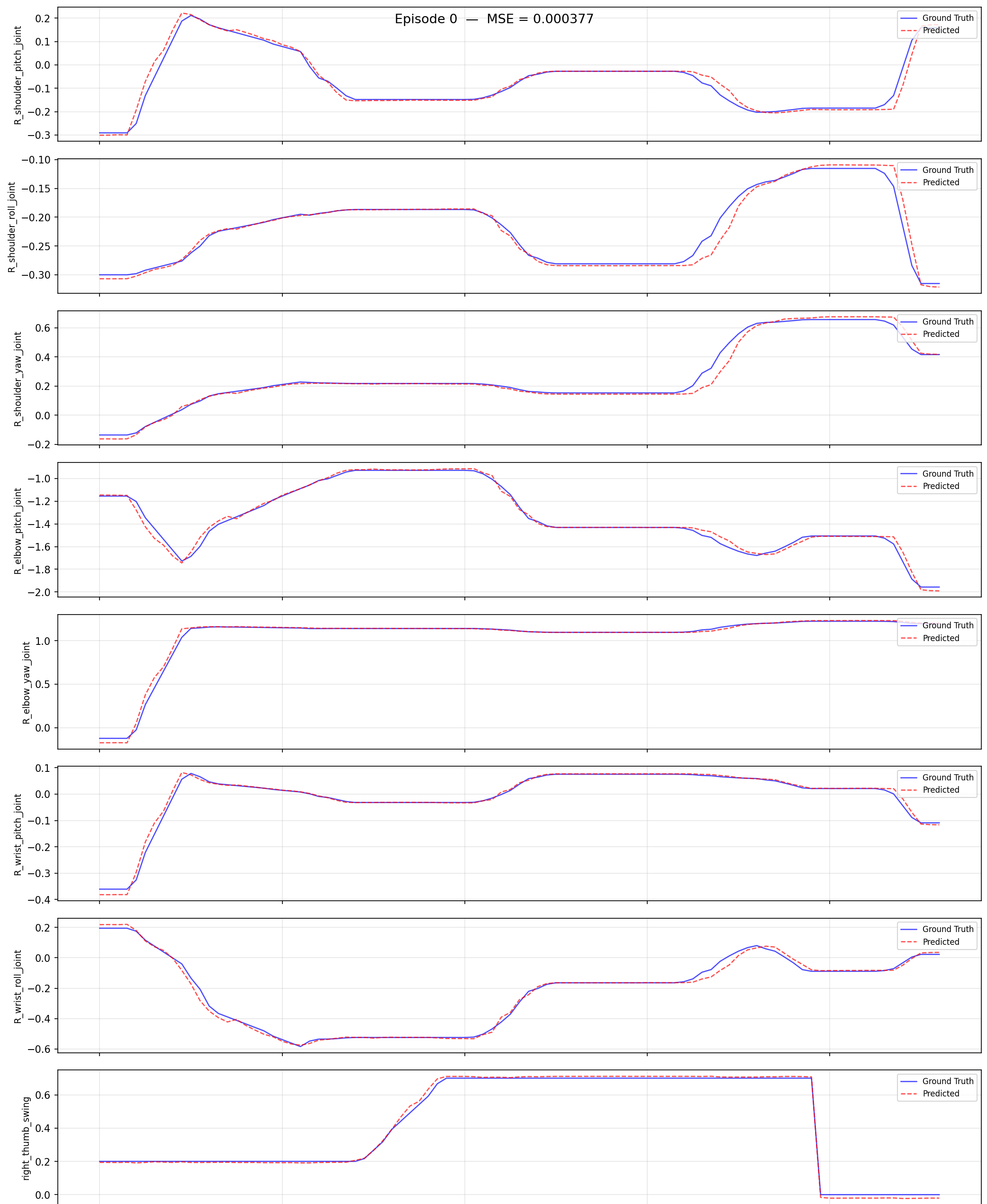
Script (shared by all robots): /ubt_IL/scripts/eval/eval_policy.py. It runs offline inference over a LeRobot dataset, computes the per-frame MSE between predicted and ground-truth actions, and can plot per-episode comparisons. Quantify policy quality before deployment.
Evaluation command:
/lerobot/.venv/bin/python /ubt_IL/scripts/eval/eval_policy.py \
  --policy-path /ubt_IL/model/walker_c1_sim_26d_act_1RGB/checkpoints/last/pretrained_model \
  --dataset-path /ubt_IL/dataset/walker_c1_sim_26d_1RGB \
  --episodes 5 \
  --inference-freq 15 \
  --plot \
  --plot-dir /ubt_IL/scripts/eval/output/eval_walker_c1_sim_26d_act \
  --output /ubt_IL/scripts/eval/output/eval_walker_c1_sim_26d_act/results.json \
  --device cuda
--inference-freq 15 emulates a 15 Hz deployment cadence; 1 means step-by-step inference.
| Argument | Description |
|---|---|
--policy-path |
Trained ACT checkpoint (the pretrained_model directory) |
--dataset-path |
LeRobot dataset root (containing meta/info.json) |
--episodes |
Number of episodes to evaluate (default: all) |
--inference-freq |
Run inference every N steps to emulate the deployment chunk queue; defaults to policy.n_action_steps; 1 means every step |
--plot / --plot-dir |
Per-episode prediction-vs-ground-truth plots (PNG) |
--output |
Result JSON (summary + per-episode MSE) |
--device |
cuda (default; falls back to cpu when unavailable) |
Once evaluation passes, continue with §6 Model deployment.
6. Model deployment¶
Script: /ubt_IL/scripts/deploy/walker_c1/rollout.sh. It loads a checkpoint and sends actions to Isaac Sim or the real robot through the ROS2-ZMQ bridge. A dimension precheck runs before deployment, and sdk_guard.sh validates the half_sdk state. Helper tools: robot_ready.sh (three-stage ready pose), robot_home.sh (return home), preview_camera.py (camera path check), inference_server.sh (warm-started inference service).
Deployment command (optional variables are listed below; unset values use script defaults):
WALKER_C1_REAL=1 \
POLICY_PATH=<checkpoint pretrained_model directory> \
ROBOT_MODEL=walker_c1_13d \
DURATION=10 FPS=30 \
  bash /ubt_IL/scripts/deploy/walker_c1/rollout.sh
Deployment guides:
- Simulation deployment (feedback into the simulator; recommended first): Simulation workflow · Sim deployment
- Real-robot deployment (half_sdk guard and safety precheck): Real-robot workflow · Deployment · Real-robot deployment
- Inference server (warm start / external calls): Inference server
Common environment variables:
| Variable | Default | Description |
|---|---|---|
POLICY_PATH |
Required, no default | Checkpoint directory (containing config.json) |
ROBOT_MODEL |
Real: walker_c1_13d / sim: walker_c1_26d |
ROBOT_MODELS key (also used as --robot.joint_config); must match the training DOF |
ROBOT_CONFIG |
configs/<ROBOT_MODEL>.json |
Hardware config JSON |
ROBOT_TYPE |
walker_c1 |
Plugin registration name |
WALKER_C1_REAL |
1 |
1 = real robot (13d/task/act_async/guard/real camera); 0 = simulation/offline |
EPISODES |
1 |
Number of episodes; the base strategy does not support multi-episode runs, so values >1 use an outer loop with a reset per episode |
DURATION |
30 |
Maximum seconds per episode |
FPS |
15 |
Control rate (use FPS=30 for 30 fps datasets) |
RESET_MODE |
Real: task / sim: sim-scene |
Reset before each episode: sim-scene / task / both / none |
INFERENCE_TYPE |
Real: act_async / sim: sync |
sync / act_async (chunk -> bridge blending at 300 Hz) |
INFERENCE_HZ |
Real: 1 / sim: 2 |
act_async replanning rate |
EXECUTION_HORIZON |
0 |
Truncate act_async chunks after N steps (0 = no truncation) |
CAMERA_TOPIC / CAMERA_MSG_TYPE |
Real: head left + shm_msgs/Image6m |
Simulation must override to /sensor/camera/head/color/raw + sensor_msgs/Image |
SDK_GUARD |
Real: 1 / sim: auto |
half_sdk guard: 1 enforce / auto only when a real robot is detected / 0 skip |
SDK_AUTO_SWITCH |
0 |
1 = run sdk_mode.sh half_sdk automatically when the guard fails, then recheck |
WALKER_C1_SINGLE_ACTION_SMOOTH_S |
0.15 |
Smoothing window (seconds) for a single sync action; only affects sync; 0 triggers a warning |
See Real-robot deployment for all variables, the ROBOT_MODELS registry, and safety prechecks.
7. FAQ¶
| Symptom | Fix |
|---|---|
joint_config 'walker_c1_26d' not registered |
Plugin not installed: python /ubt_IL/walker_c1/init_walker_c1.py |
Conversion fails with a dimension mismatch (31 6) |
The data was not collected by ubt_sim walker_c1; verify the source or set CONFIG= explicitly |
| Training fails because a camera key is missing | observation.images.camera_head was not written; check meta/info.json |
| Normalization explodes (QUANTILES NaN/Inf) | Constant dimensions in the data (the left hand stays near 0 in this task). Use the 13D config or drop dead dimensions |
| rollout precheck reports a dimension mismatch | Policy dimension and ROBOT_MODEL disagree; confirm whether training used the 26D or 13D dataset |
| Camera timeout | Check the topic name, ROS_DOMAIN_ID, and QoS (must be BEST_EFFORT); on the real robot use head_stereo_left/color/raw + shm_msgs/Image6m |
torch.cuda.is_available() is False |
The container lacks NVIDIA_VISIBLE_DEVICES / NVIDIA_DRIVER_CAPABILITIES; start it with run.sh start |
| The left hand never moves | The left hand stays near 0 in the current collection batch (the task only uses the right hand); this is expected |