Walker TienKung Pro: Simulation Platform
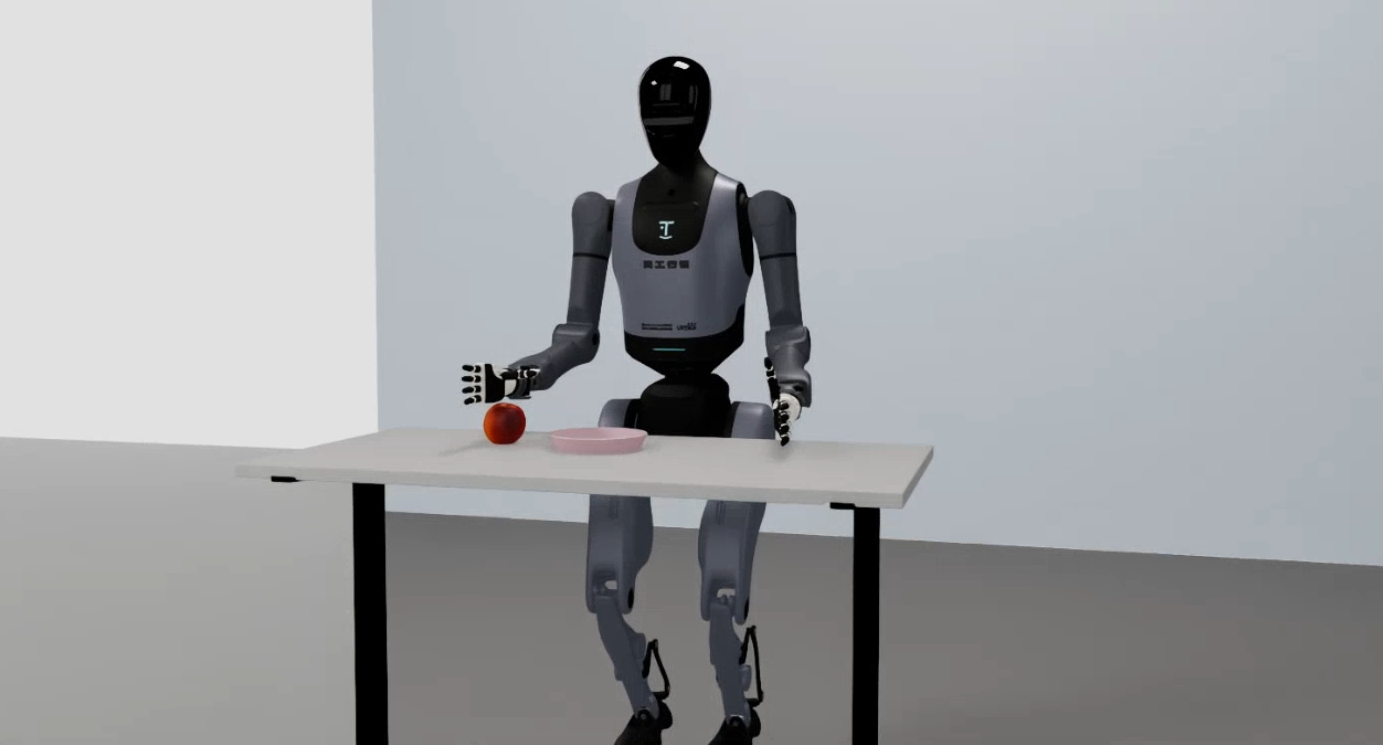
The Walker TienKung Pro simulation is built on NVIDIA Isaac Sim (Isaac Lab 2.2.0). A ROS2-ZMQ bridge publishes simulation state and images on exactly the same ROS 2 topics as the real robot, enabling sim-to-real consistent teleoperation and data collection. The whole environment runs in a Docker container.
Quick start
Commands are split into two parts: build/enter the container on the host; launch simulation and collect data inside the container (container root is
/ubt_sim).
1. Build and start the container (host)
See Simulation Platform · Container Setup for build / start / init / check / bash.
⚠️ Must be changed before building: edit
interfaceWhiteListinubt_sim/docker/fastdds_no_shm.xmland set<address>to192.168.41.99(the TienKung direct-link subnet). The file is copied into the image at build time; changes after the build have no effect.
2. Launch simulation (container)
bash run.sh bash                       # enter the container (ROS 2 environment sourced automatically)
bash /ubt_sim/scripts/start_sim.sh     # launch simulation and start the ROS2-ZMQ bridge automatically
- The simulation loads
UBTSim-TienkungPro-Parlor-v0(parlor apple picking). - Press
Rto reset the robot (1 s debounce). - When the simulation window closes, the exit trap in
start_sim.shstops the bridge automatically.
Demo (pick-and-place task):
Common environment variables/arguments (combinable):
| Variable | Purpose | Default |
|---|---|---|
UBT_SIM_TASK |
Task name (also determines the robot type) | UBTSim-TienkungPro-Parlor-v0 |
--headless |
Run without a window | Common on headless servers |
--perf_stats |
Print performance statistics | Frame-rate debugging |
--device cpu\|cuda\|cuda:N |
Execution device | For switching GPUs outside load-only mode |
3. Data collection (container, system Python 3.10)
/usr/bin/python3 /ubt_sim/teleoperation/control/tienkung_pro/reset.py                  # reset the robot to zero
/usr/bin/python3 /ubt_sim/teleoperation/control/tienkung_pro/pick_place_save_data.py   # one pick-and-place + recording
bash /ubt_sim/teleoperation/control/tienkung_pro/save_data.sh                # batch loop (400 iterations by default)
reset.py: resets the robot pose only.pick_place_save_data.py: performs one complete pick-and-place (random apple position → grasp → place → return) and records both arms/hands, actions, head RGB+depth images, and timestamps at 15 Hz. It saves only when the task succeeds (apple in the plate, distance < 0.12 m); failed episodes are discarded with exit code 1.save_data.sh: callspick_place_save_data.pyin a loop for batch collection.- Output:
/ubt_sim/dataset/tienkung_pro/<timestamp>/trajectory.hdf5. - Use
--headlessduring collection to increase rendering speed and improve dataset throughput.
4. Camera test (container)
# Test the direct camera stream
python3 /ubt_sim/teleoperation/image/image_client.py
# Test the ROS 2 image path and save 3 JPEGs
/usr/bin/python3 /ubt_sim/teleoperation/image/test_ros_image.py
The direct JPEG stream from simulation (127.0.0.1:5558, published by the simulation process without the bridge) opens a window showing the head camera and prints latency/drop statistics. Simulation must already be running.
5. Dataset preview and playback (container)
Reads dataset/tienkung_pro/<timestamp>/trajectory.hdf5, previews cameras + joint curves (Rerun), or replays recorded actions on simulation/hardware topics.
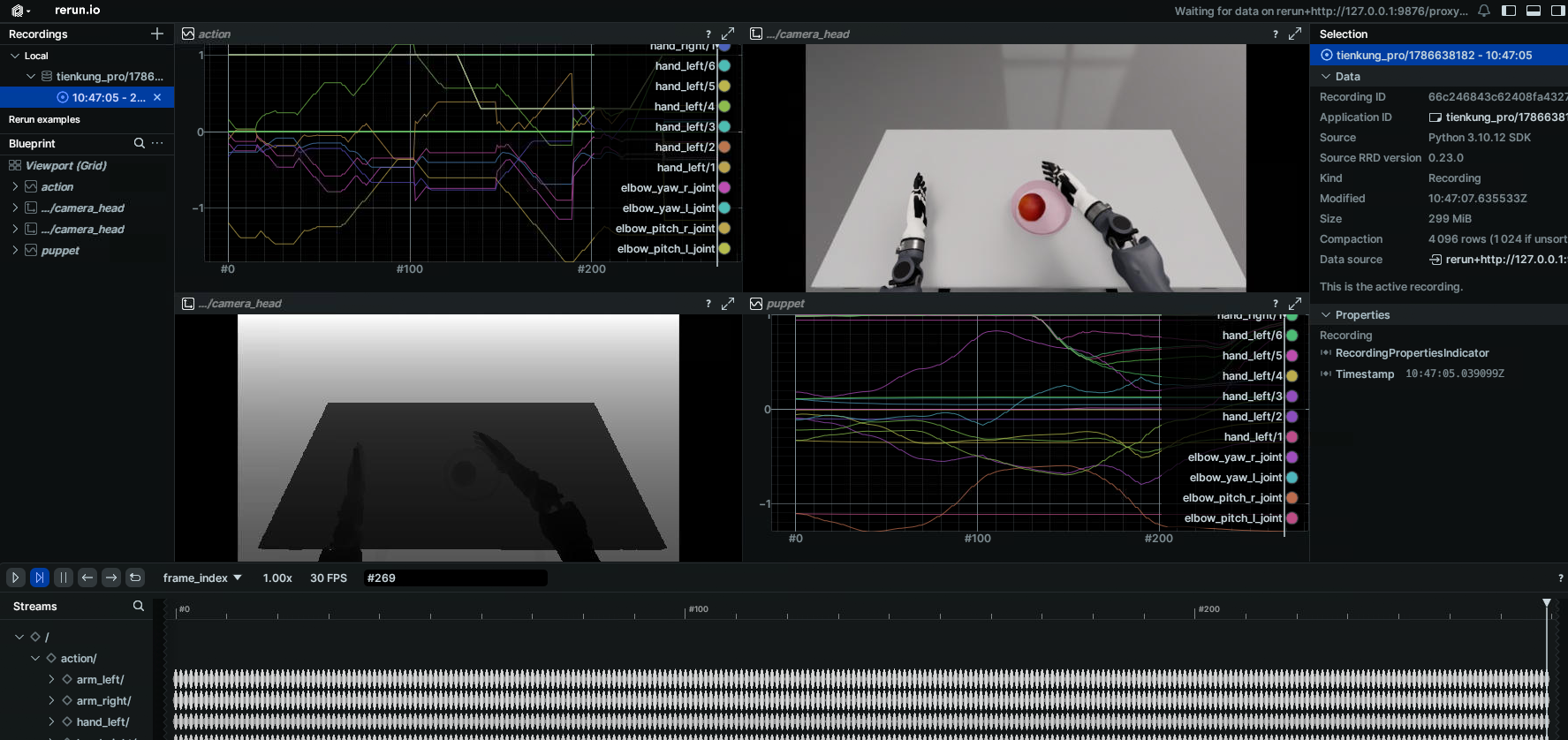
# Preview an HDF5 episode
/usr/bin/python3 /ubt_sim/teleoperation/tools/playback_tienkung_pro.py \
    --episode dataset/tienkung_pro/1786638182 --mode preview --web-port 9090

# Action playback (simulation/hardware)
/usr/bin/python3 /ubt_sim/teleoperation/tools/playback_tienkung_pro.py \
    --episode dataset/tienkung_pro/1786638182 --mode control
See Playback for all options and safety notes.
Simulation modules
| Module | Path | Description |
|---|---|---|
| Docker orchestration | ubt_sim/docker/run.sh |
Image build, container lifecycle, bridge start/stop |
| Environment variables | ubt_sim/docker/env.sh |
Container name, image, ROS_DOMAIN_ID |
| Simulation launcher | ubt_sim/scripts/start_sim.sh |
Detects the robot, starts the bridge, launches sim_runner.py |
| Task definition | ubt_sim/source/ubt_sim/task/tienkung_pro_parlor/ |
Parlor apple-picking scene and rewards |
| Runtime config | ubt_sim/config/tienkung_pro/parlor.yaml |
Scene/camera/device parameters |
| ROS2-ZMQ bridge | ubt_sim/teleoperation/bridges/tienkung_pro/ |
Bridge script + bridge_config.yaml |
| Teleoperation and collection | ubt_sim/teleoperation/control/tienkung_pro/ |
reset.py / pick_place_save_data.py / save_data.sh |
| Camera client | ubt_sim/teleoperation/image/image_client.py |
Direct JPEG stream (5558) debugging |
| Data output | ubt_sim/dataset/tienkung_pro/<timestamp>/trajectory.hdf5 |
Collected episodes |
ZMQ ports
| Port | Purpose |
|---|---|
| 5555 | Control commands (bridge PUB) |
| 5556 | Robot state (bridge SUB) |
| 5557 | Raw camera images (C++ bridge) |
| 5558 | Direct JPEG (published by simulation, no bridge) |
See Architecture · ZMQ ports for the cross-robot overview.
Troubleshooting
bash run.sh checkreports errors: follow the prompt and rerunbash run.sh init; verifynumpy<2,bodyctrl_msgs, and the Walker SDK ROS 2 message packages.- Collection script fails to import rclpy / message types: use
/usr/bin/python3, not Isaac Sim Python, and confirmbash run.sh initbuilt the message packages. save_data.shtrips the consecutive-failure breaker: usually the bridge is not ready. Verify the simulation window is running and the bridge process exists (pgrep -f tienkung_pro_ros2_zmq_bridge), or runbash run.sh bridge-startseparately.- X11 unavailable / no simulation window: run
xhost +on the host and verifyDISPLAYis forwarded; on headless machines onlyUBT_SIM_LOAD_ONLY=1preview is available.
After collection, continue with Imitation Learning Platform.