Walker TienKung Dex: Imitation Learning Platform¶
Code:
ubt_IL/scripts/{convert,train,eval,deploy}/tienkung_dex/(run inside the container) Prerequisite: repository cloned and submodules initialized as described in Getting Started; HDF5 data ready (simulation collection or real-robot collection)
This page documents the shared conversion/training/evaluation/deployment workflow and configuration parameters for Walker TienKung Dex. Data-source-specific commands are embedded in the corresponding workflow pages.
1. Environment (ubt_IL container)¶
See Imitation Learning Platform · Container Setup for build / start / bash.
- The host project is mounted at
/ubt_IL. - Communication: LeRobot (Python 3.12) —ZMQ
5559/5560—> Bridge2 (system Python 3.10) —ROS 2 DDS—> robot/simulator. - Camera stream: simulation uses 5758 (ubt_sim publishes JPEG directly); hardware uses 5558 (Bridge2 transcodes with
--enable-image). - Dex message packages (
ros2_bridge_msgs/inspire_hand_msgs/brainco_hand_msgs) are built into/opt/tienkung_dex_msgs_wsduring the image build; the threetienkung_dexlines inbash run.sh checkshould all be[OK]. - To run the policy on the robot itself (Thor, no container), skip this section and create the venv as described in On-robot deployment.
2. Data conversion (HDF5 -> LeRobot)¶
Script: /ubt_IL/scripts/convert/tienkung_dex/convert.sh (shared converter convert/common/convert_to_lerobot.py). It converts raw HDF5 into a LeRobot v3 dataset at /ubt_IL/dataset/<REPO_ID>/.
Conversion command:
CONFIG=/ubt_IL/scripts/convert/tienkung_dex/configs/tienkung_dex_20d_1RGB_inspire.json \
SRC_ROOT=/ubt_sim/dataset/tienkung_dex \
TGT_PATH=/ubt_IL/dataset \
REPO_ID=tienkung_dex_sim_pick_apple \
TASK_NAME=tienkung_dex_sim_pick_apple \
FPS=15 \
bash /ubt_IL/scripts/convert/tienkung_dex/convert.sh --overwrite
Examples:
- Simulation data: Simulation workflow · Data conversion
- Real-robot data: Real-robot workflow · Data conversion
Conversion configs in /ubt_IL/scripts/convert/tienkung_dex/configs/:
| Config | Dimension | Hand / scenario | Image |
|---|---|---|---|
tienkung_dex_20d_1RGB_inspire.json |
20D (right arm 7 + right hand 13) | Inspire, simulation (default) | 3×360×640 |
tienkung_dex_13d_1RGB_brainco_real.json |
13D (right arm 7 + right hand 6) | BrainCo, real robot (verified) | 3×360×640 |
tienkung_dex_real_pick_r13_1RGB.json |
13D (right arm 7 + right hand 6) | Inspire r13 real robot (pico6) | 3×720×1280 |
Common environment variables (defaults can be omitted; see bash convert.sh -h and Data Conversion):
| Variable | Description |
|---|---|
SRC_ROOT |
HDF5 root (default /ubt_IL/dataset/tienkung_dex; falls back to /ubt_sim/dataset/tienkung_dex if absent) |
TGT_PATH |
LeRobot output root (default /ubt_IL/dataset) |
CONFIG |
Conversion config JSON (default tienkung_dex_20d_1RGB_inspire.json) |
REPO_ID |
Output dataset name (default tienkung_dex_sim_pick_apple; keep it consistent with training) |
TASK_NAME |
Task name (default tienkung_dex_sim_pick_apple, written to each frame's task field) |
FPS |
Target frame rate (simulation default 15; use FPS=30 for 30 fps real-robot data) |
ROBOT_TYPE |
Robot type (default tienkung_dex, written to metadata) |
VCODEC |
Video codec (default h264) |
HDF5_REL_PATH |
HDF5 path relative to each episode directory (default trajectory.hdf5) |
TRIM_STATIONARY |
1 enables stationary-frame trimming (disabled by default) |
STATIONARY_DIAGNOSE |
1 only reports the stationary distribution without writing data (for threshold calibration) |
STATIONARY_CAP / STATIONARY_THRESH |
Maximum stationary run (default 8 frames) / detection threshold (default 0.03) |
RESAMPLE_FPS |
Target frame rate; enables resampling when set (disabled by default) |
Stationary-frame trimming
Stationary frames can trap the policy in a local stationary loop. Dex simulation data is not trimmed by default: run with STATIONARY_DIAGNOSE=1 first, then decide whether to set TRIM_STATIONARY=1. On 20 episodes with default parameters, trimming reduced 10,937 → 8,269 frames (-24.4%) while preserving the 20D ranges and the maximum per-frame step. Real-robot data can enable it as needed (removing long stationary ready-pose segments at the start and end).
State / action sources:
| Field | HDF5 source | Columns |
|---|---|---|
observation.state |
joint_observations/joint_position + hand_observations/hand_right_position (measured values) |
[24..30] + all 13 right-hand columns |
action |
action_observations/joint_position + action_observations/hand_right_position (commanded values) |
Same |
Do not swap them:
action_*are the recorded commands,*_observationsare measurements. Hand actions lead states by up to 1.31 rad, which matches the semantics ofget_observation()during deployment.
Output: a LeRobot v3 dataset under /ubt_IL/dataset/<REPO_ID>/ (meta/, chunk-000/ data parquet, videos/).
3. Data visualization¶
After conversion, inspect dataset quality with lerobot-dataset-viz:
HF_HUB_OFFLINE=1 lerobot-dataset-viz \
  --repo-id <REPO_ID> \
  --episode-index 0 \
  --root /ubt_IL/dataset/<REPO_ID>
--rootmust point to the dataset directory containingmeta/(therepo_iddirectory itself), not its parent.--episode-indexis required and visualizes one episode at a time.
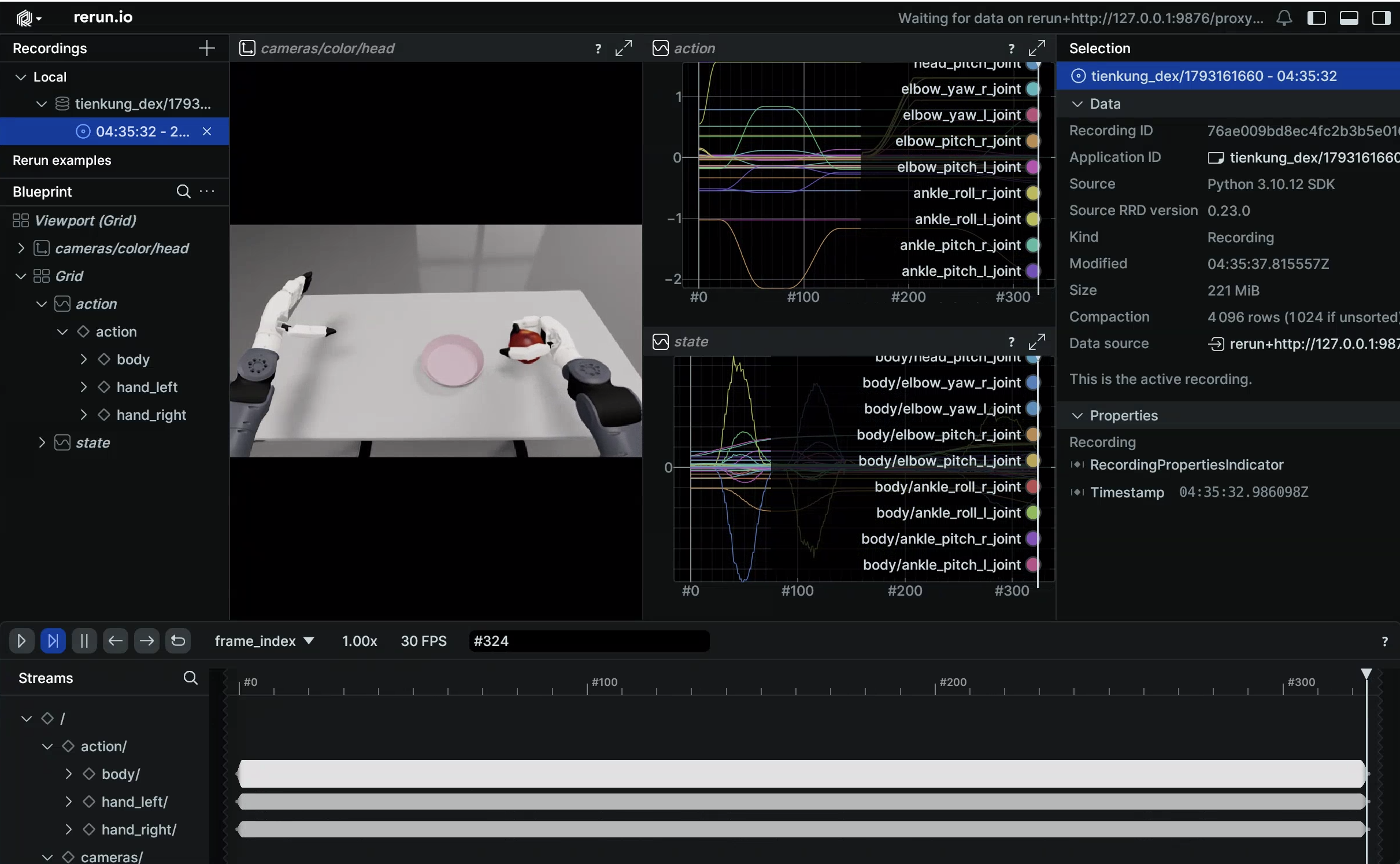
Examples: Simulation workflow · Visualization / Real-robot workflow · Evaluation.
4. Policy training (ACT)¶
Training script: /ubt_IL/scripts/train/tienkung_dex/train.sh; configs in /ubt_IL/scripts/train/tienkung_dex/configs/.
Training command (optional overrides are listed below; unset values come from the config file):
CONFIG_PATH=/ubt_IL/scripts/train/tienkung_dex/configs/train_config_tienkung_dex_sim_pick_apple.json \
OUTPUT_DIR=/ubt_IL/model/tienkung_dex_sim_pick_apple_act \
STEPS=60000 SAVE_FREQ=10000 BATCH_SIZE=16 \
bash /ubt_IL/scripts/train/tienkung_dex/train.sh
Training configs (ACT, chunk_size=50, n_action_steps=20, dim_model=512):
| Config | Dataset | Steps / save interval | Batch |
|---|---|---|---|
train_config_tienkung_dex_sim_pick_apple.json |
tienkung_dex_sim_pick_apple |
60000 / 10000 | 16 |
train_config_tienkung_dex_real_pick_apple.json |
tienkung_dex_real_pick_apple |
30000 / 5000 | 16 |
train_config_tienkung_dex_real_pick_apple_brainco_13d.json |
tienkung_dex_real_pick_apple_brainco_13d |
20000 / 5000 | 16 |
⚠️
train.shdefaultsCONFIG_PATHto the simulation config; real-robot training must specify the real config explicitly.
Smoke test and resume:
# Smoke test: 2 steps, no checkpoint
bash /ubt_IL/scripts/train/tienkung_dex/train.sh --steps=2 --save_checkpoint=false

# Resume (CONFIG_PATH points to train_config.json inside the checkpoint)
CONFIG_PATH=/ubt_IL/model/tienkung_dex_sim_pick_apple_act/checkpoints/last/pretrained_model/train_config.json \
RESUME=true bash /ubt_IL/scripts/train/tienkung_dex/train.sh
Without train.sh (call lerobot-train directly from /ubt_IL/lerobot):
cd /ubt_IL/lerobot
HF_HUB_OFFLINE=1 /lerobot/.venv/bin/lerobot-train \
  --config_path=/ubt_IL/scripts/train/tienkung_dex/configs/train_config_tienkung_dex_sim_pick_apple.json \
  --output_dir=/ubt_IL/model/tienkung_dex_sim_pick_apple_act
Common overrides (only applied when the environment variable is set; HF_HUB_OFFLINE=1 is enabled by default):
| Variable | Description |
|---|---|
CONFIG_PATH |
Training config JSON (default: simulation config) |
DATASET_REPO_ID / DATASET_ROOT |
Dataset name / root (must match the conversion REPO_ID) |
OUTPUT_DIR |
Model output directory (checkpoints under checkpoints/<step>/pretrained_model/) |
STEPS / SAVE_FREQ |
Training steps / checkpoint interval |
BATCH_SIZE / SEED |
Batch size / random seed |
DEVICE |
Training device (default cuda) |
RESUME |
Resume training (default false) |
WANDB_ENABLE |
Enable wandb logging (default false) |
5. Policy evaluation (offline MSE)¶
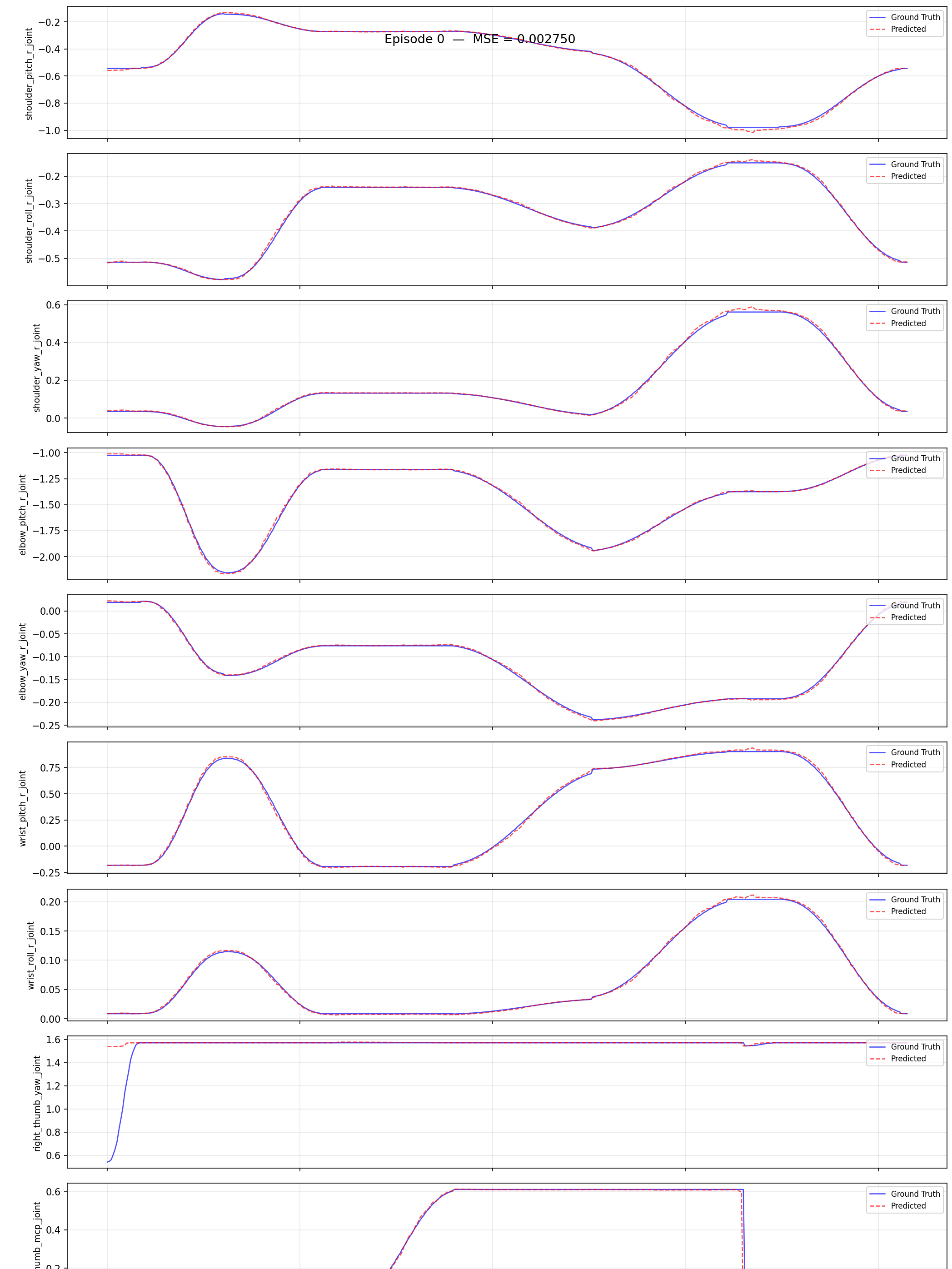
Script (shared by all robots): /ubt_IL/scripts/eval/eval_policy.py. It runs offline inference over a LeRobot dataset, computes the per-frame MSE between predicted and ground-truth actions, and can plot per-episode comparisons.
Evaluation command:
/lerobot/.venv/bin/python /ubt_IL/scripts/eval/eval_policy.py \
  --policy-path /ubt_IL/model/tienkung_dex_sim_pick_apple_act/checkpoints/last/pretrained_model \
  --dataset-path /ubt_IL/dataset/tienkung_dex_sim_pick_apple \
  --episodes 5 \
  --inference-freq 1 \
  --plot \
  --plot-dir /ubt_IL/scripts/eval/output/eval_tienkung_dex_sim_pick_apple_act \
  --output /ubt_IL/scripts/eval/output/eval_tienkung_dex_sim_pick_apple_act/results.json \
  --device cuda
--inference-freq 1 means step-by-step inference, closest to deployment behavior; the default queues by n_action_steps.
| Argument | Description |
|---|---|
--policy-path |
Trained ACT checkpoint (the pretrained_model directory) |
--dataset-path |
LeRobot dataset root (containing meta/info.json) |
--episodes |
Number of episodes to evaluate (default: all) |
--inference-freq |
Run inference every N steps to emulate the deployment chunk queue; 1 means every step |
--plot / --plot-dir |
Per-episode prediction-vs-ground-truth plots (PNG) |
--output |
Result JSON (summary + per-episode MSE) |
--device |
cuda (default; falls back to cpu when unavailable) |
Offline MSE is only for ranking checkpoints from the same training run. The final criterion remains
/sim/task_completedin simulation or task success on hardware.
6. Model deployment¶
Script: /ubt_IL/scripts/deploy/tienkung_dex/rollout.sh (starts Bridge2 automatically). Prerequisite: run robot_ready.sh to move to the ready pose before running the policy; the order must not be reversed. A dimension precheck (policy action dimension vs JOINT_CONFIG) runs before deployment.
Deployment command:
POLICY_PATH=<checkpoint pretrained_model directory> \
JOINT_CONFIG=tienkung_dex_20 \
CAMERA_PORT=5758 FPS=15 DURATION=60 \
  bash /ubt_IL/scripts/deploy/tienkung_dex/rollout.sh
Deployment guides:
- Simulation deployment: Simulation workflow · Model deployment (sim)
- Real-robot deployment (BrainCo 13D verified): Real-robot workflow · Model deployment (real)
- On-robot deployment (Thor, no container): On-robot deployment
Common environment variables:
| Variable | Default | Description |
|---|---|---|
POLICY_PATH |
Required | Checkpoint directory (containing config.json) |
JOINT_CONFIG |
tienkung_dex_20 |
tienkung_dex_20 (Inspire 13 rad) / tienkung_dex_brainco_13 (BrainCo 6 motors) / tienkung_dex_inspire_13 (Inspire 6D 0~1 → 13 codes); must match the training DOF |
HAND_VARIANT |
Empty | Empty follows JOINT_CONFIG; if set explicitly, the two must agree |
HAND_ACTION_MODE |
Empty (auto) | Empty derives from JOINT_CONFIG; set rad13 / pico6 explicitly when debugging |
FPS |
15 |
Control loop rate (= dataset frame rate; use FPS=30 for 30 fps datasets) |
DURATION |
60 |
Run time (seconds) |
TASK |
pick apple |
Task description |
CAMERA_PORT |
5758 |
Simulation 5758 (ubt_sim publishes JPEG) / hardware 5558 (Bridge2 transcodes) |
IMAGE_ENABLED |
0 |
Set 1 on hardware so Bridge2 encodes the head camera as JPEG |
MAX_RELATIVE_TARGET |
Empty (unlimited) | Per-step relative target limit in rad; 0.01 recommended for the first hardware run |
INFERENCE_TYPE |
sync |
Only sync is supported (the Dex bridge has no chunk consumer) |
ZMQ_HOST |
127.0.0.1 |
Bridge address (use the peer IP for cross-machine deployment) |
See Real-robot workflow §6 for all parameters, the three hand representations, and Bridge2 group switches.
7. FAQ¶
| Symptom | Fix |
|---|---|
| Normalization explodes during training (QUANTILES NaN/Inf) | Constant dimensions in the data; Dex uses only the right arm 7 + right hand, and constant dimensions are already dropped in the conversion config |
| Trajectory contains long stationary segments; the policy stops during deployment | Add TRIM_STATIONARY=1 during conversion (disabled by default; run STATIONARY_DIAGNOSE=1 first to inspect the distribution) |
| Hand does not move / fingers globally misaligned | HAND_VARIANT / JOINT_CONFIG does not match the physical hand, or the plugin and Bridge2 constant copies have drifted (Bridge2 logs "channel table mismatch") |
| No camera image during deployment | Simulation: check whether 5758 has a stream. Hardware: check whether Bridge2 runs with --enable-image and uses port 5558 |
| Robot does not move in simulation | Check ROS_DOMAIN_ID matches simulation (ubt_sim defaults to 0), whether robot_ready.sh ran first, and reset the scene with /sim/cmd_reset |
| Arm hits the table right after starting | robot_ready.sh was not run, or --stage-durations forced the motion to be too fast |
Inference service rejects load |
Dex does not support model hot-swap; shutdown and launch again |
Training raises FileExistsError |
OUTPUT_DIR already exists with RESUME=false; use a new directory or delete the old one |
| Training runs out of memory | Reduce BATCH_SIZE; close simulation first if it is occupying GPU memory |