Walker TienKung Pro Real-Robot Workflow: Collect -> Convert -> Train -> Evaluate -> Deploy
Robot: Walker TienKung Pro hardware
This guide covers the complete, copy-pasteable flow from raw real-robot HDF5 to a LeRobot dataset, ACT training, offline evaluation, and finally real-robot deployment. Conversion/training/evaluation run in the ubt_IL container; deployment offers a "container" option and a "Jetson host" option.
Contents
- 0. Workflow overview
- 1. Prerequisite: real-robot data collection
- 2. Start the container (ubt_IL)
- 3. Data conversion (HDF5 -> LeRobot)
- 3.1 Conversion command
- 3.2 Data visualization
- 4. Policy training
- 5. Policy evaluation (offline MSE)
- 6. Model deployment (real robot)
- Option A: remote container (x86 workstation -> robot)
- Option B: on-robot Jetson AGX Orin
- 7. FAQ
0. Workflow overview
Real-robot collection (hdf5) --> Data conversion (LeRobot dataset) --> Model training [train.sh ACT] --> Policy evaluation [eval_policy.py] --> Model deployment [rollout.sh] --> Real-robot deployment [robot]
1. Prerequisite: real-robot data collection
Data is currently collected with the Thinker Studio teleoperation platform (see the official documentation), which can export LeRobot v3.0 datasets directly. You can also place collected real-robot HDF5 data under /ubt_IL/dataset/hdf5/ (or any SRC_ROOT) and proceed to conversion.
2. Start the container (ubt_IL)
cd ubt_IL/docker

# ⚠️ Must be checked before building: edit interfaceWhiteList in ubt_IL/docker/fastdds_no_shm.xml
# and set <address> to 192.168.41.99 (TienKung direct-link subnet). The file is copied into the image
# at build time, so changes after the build have no effect.
bash run.sh build      # first time
bash run.sh start
bash run.sh bash       # enter the container; run conversion/training/evaluation there
3. Data conversion (HDF5 -> LeRobot)
3.1 Conversion command
Script: /ubt_IL/scripts/convert/tienkung_pro/convert.sh
Configs: /ubt_IL/scripts/convert/tienkung_pro/configs/, including field filtering and mapping; choose or adapt one for your training needs.
# Real-robot conversion
SRC_ROOT=/ubt_IL/dataset/hdf5 \
TGT_PATH=/ubt_IL/dataset \
CONFIG=/ubt_IL/scripts/convert/tienkung_pro/configs/tienkung_pro_26d_1RGB_real.json \
REPO_ID=real_pick_place \
FPS=15 \
ROBOT_TYPE=tienkung \
TASK_NAME=real_pick_place \
bash /ubt_IL/scripts/convert/tienkung_pro/convert.sh

# Stationary frames can trap the policy in a local stationary loop; enable trimming with TRIM_STATIONARY=1
TRIM_STATIONARY=1 \
SRC_ROOT=/ubt_IL/dataset/hdf5 \
TGT_PATH=/ubt_IL/dataset \
CONFIG=/ubt_IL/scripts/convert/tienkung_pro/configs/tienkung_pro_26d_1RGB_real.json \
REPO_ID=real_pick_place \
FPS=15 \
ROBOT_TYPE=tienkung \
TASK_NAME=real_pick_place \
bash /ubt_IL/scripts/convert/tienkung_pro/convert.sh
Environment variables (defaults can be omitted; see bash convert.sh -h for the rest):
| Variable | Recommended for hardware | Description |
|---|---|---|
SRC_ROOT |
/ubt_IL/dataset/hdf5 |
Real HDF5 root (one subdirectory per episode containing trajectory.hdf5) |
TGT_PATH |
/ubt_IL/dataset (default) |
LeRobot output root |
CONFIG |
configs/tienkung_pro_26d_1RGB_real.json |
26D dual arm, head RGB only, action mapped to master (gripper invert/repeat/pad); use tienkung_pro_13d_1RGB.json for 13D real models |
REPO_ID |
real_pick_place |
Output dataset name (keep it consistent with training) |
FPS |
15 |
Target frame rate |
ROBOT_TYPE |
tienkung |
Robot type |
TASK_NAME |
real_pick_place |
Task name (written to each frame's task field and used as the language condition) |
VCODEC |
h264 (default) |
Video codec |
HDF5_REL_PATH |
trajectory.hdf5 (default) |
HDF5 path relative to each episode directory |
TRIM_STATIONARY |
Empty (off) / 1 |
Stationary-frame trimming: truncate runs longer than the cap (default 8 frames) |
STATIONARY_DIAGNOSE |
Empty / 1 |
Only report the stationary distribution without writing data (for threshold calibration) |
RESAMPLE_FPS |
Empty (no resampling) | Target frame rate; enables resampling |
Multiple real-robot batches can be converted into the same
REPO_IDand then merged (e.g.real_merged); usetienkung_pro_13d_1RGB.jsonfor 13D real models.
Output: a LeRobot v3 dataset under /ubt_IL/dataset/<REPO_ID>/ (meta/, chunk-000/ data parquet, videos/).
3.2 Data visualization
Use lerobot-dataset-viz inside the container to inspect the converted dataset. Checking data before training is important to avoid training blindly:
# Inside the container:
HF_HUB_OFFLINE=1 lerobot-dataset-viz \
  --repo-id <dataset name> \
  --episode-index 0 \
  --root /ubt_IL/dataset/<dataset name>
Example:
# Visualize the merged TienKung pick-up dataset
HF_HUB_OFFLINE=1 lerobot-dataset-viz \
  --repo-id tienkung_pick_up_merged \
  --episode-index 0 \
  --root /ubt_IL/dataset/tienkung_pick_up_merged
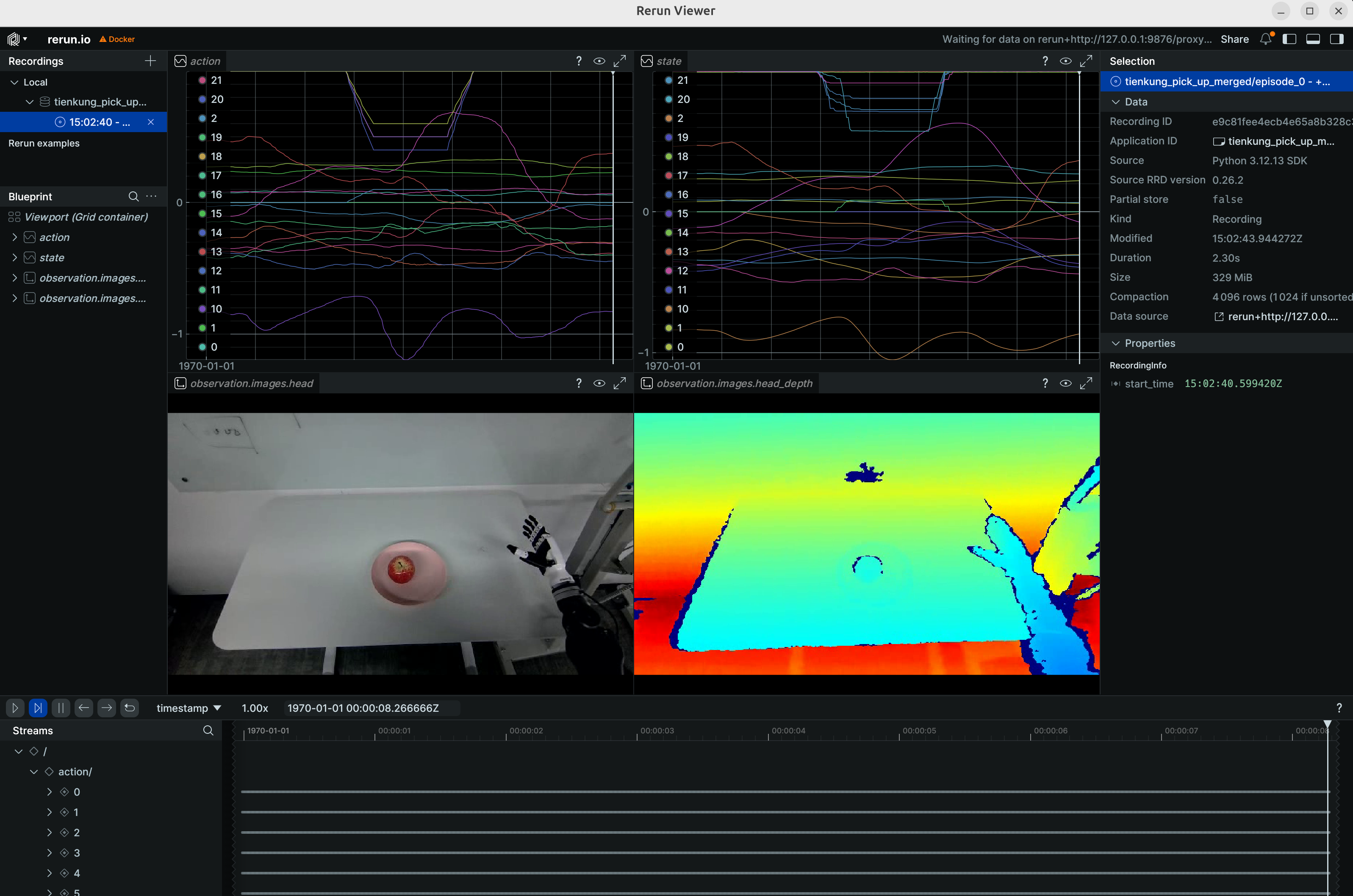
Note:
--rootmust point to the dataset directory containingmeta/(therepo_iddirectory itself), not its parent.HF_HUB_OFFLINE=1disables access to the HuggingFace Hub.
4. Policy training
Training script: /ubt_IL/scripts/train/tienkung_pro/train.sh
Configs: /ubt_IL/scripts/train/tienkung_pro/configs/; choose or adapt one for your training needs.
Note:
train.shdefaultsCONFIG_PATHto the simulation config; real-robot training must specifyCONFIG_PATHexplicitly.
# Real-robot 26D training (common config overrides)
CONFIG_PATH=/ubt_IL/scripts/train/tienkung_pro/configs/train_config_tienkung_pro_real_pick_place.json \
DATASET_REPO_ID=tienkung_pick_up_merged \
DATASET_ROOT=/ubt_IL/dataset/tienkung_pick_up_merged \
OUTPUT_DIR=/ubt_IL/model/tienkung_pick_up_merged \
bash /ubt_IL/scripts/train/tienkung_pro/train.sh

# Resume (CONFIG_PATH points to train_config.json inside the checkpoint)
CONFIG_PATH=/ubt_IL/model/tienkung_pick_up_merged/checkpoints/last/pretrained_model/train_config.json \
RESUME=true \
bash /ubt_IL/scripts/train/tienkung_pro/train.sh
Without train.sh (call lerobot-train directly with --xxx=yyy overrides; run from /ubt_IL/lerobot):
# Train from scratch
cd /ubt_IL/lerobot
HF_HUB_OFFLINE=1 /lerobot/.venv/bin/lerobot-train \
  --config_path=/ubt_IL/scripts/train/tienkung_pro/configs/train_config_tienkung_pro_real_pick_place.json \
  --dataset.repo_id=tienkung_pick_up_merged \
  --dataset.root=/ubt_IL/dataset/tienkung_pick_up_merged \
  --output_dir=/ubt_IL/model/tienkung_pick_up_merged

# Resume
HF_HUB_OFFLINE=1 /lerobot/.venv/bin/lerobot-train \
  --config_path=/ubt_IL/model/tienkung_pick_up_merged/checkpoints/last/pretrained_model/train_config.json \
  --resume=true
Common overrides (environment variables for train.sh; unset values come from the config file):
| Variable | Config default | Description |
|---|---|---|
CONFIG_PATH |
Simulation config (train_config_tienkung_pro_sim_pick_place.json) |
Training config JSON; real-robot training must specify the real config explicitly |
DATASET_REPO_ID / DATASET_ROOT |
tienkung_pick_up_merged / /ubt_IL/dataset/tienkung_pick_up_merged |
Dataset name / root (DATASET_ROOT must be the dataset directory containing meta/, matching the conversion REPO_ID) |
OUTPUT_DIR |
/ubt_IL/model/tienkung_pick_up_merged |
Model output directory (checkpoints under checkpoints/last/pretrained_model/) |
STEPS |
100000 |
Training steps |
SAVE_FREQ |
10000 |
Checkpoint save interval (steps) |
BATCH_SIZE |
8 |
Batch size |
RESUME |
false |
Resume training (true makes CONFIG_PATH point to train_config.json inside the checkpoint) |
5. Policy evaluation (offline MSE)
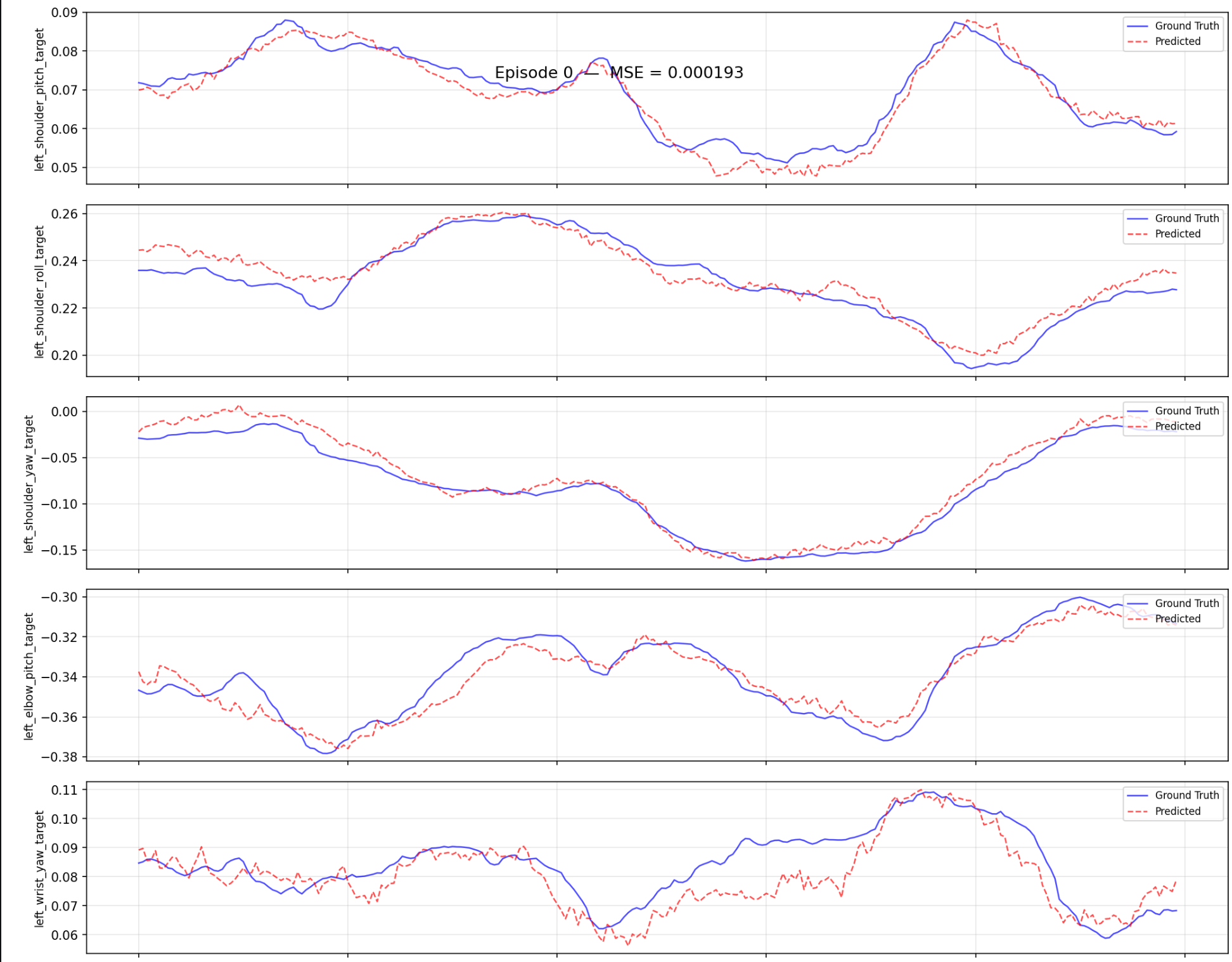
Script: /ubt_IL/scripts/eval/eval_policy.py. It runs offline inference over a LeRobot dataset, computes the per-frame MSE between predicted and ground-truth actions, and can plot per-episode comparisons. Quantify policy quality before deployment.
# Inside the container (LeRobot venv Python)
/lerobot/.venv/bin/python /ubt_IL/scripts/eval/eval_policy.py \
  --policy-path /ubt_IL/model/tienkung_pick_up_act/checkpoints/last/pretrained_model \
  --dataset-path /ubt_IL/dataset/tienkung_pick_up_merged \
  --episodes 5 \
  --inference-freq 1 \
  --plot \
  --plot-dir /ubt_IL/scripts/eval/output/eval_tienkung_pick_up_act \
  --output /ubt_IL/scripts/eval/output/eval_tienkung_pick_up_act/results.json \
  --device cuda
Example output (per-episode prediction vs ground truth):
Main arguments:
| Argument | Description |
|---|---|
--policy-path |
Trained ACT checkpoint (the pretrained_model directory) |
--dataset-path |
LeRobot dataset root (containing meta/info.json) |
--episodes |
Number of episodes to evaluate (default: all) |
--inference-freq |
Run inference every N steps to emulate the deployment chunk queue; defaults to policy.n_action_steps; 1 means every step |
--plot / --plot-dir |
Per-episode prediction-vs-ground-truth plots (PNG) |
--output |
Result JSON (summary + per-episode MSE) |
--device |
cuda (default; falls back to cpu when unavailable) |
Output: the console prints Mean/Std/Min/Max MSE and per-joint MSE; --output saves the result JSON and --plot saves comparison plots.
6. Model deployment (real robot)
Prerequisites:
- The robot is powered on and in half-body motion-control mode.
- Operation sequence: power on and press A for self-check -> press D to home -> place the robot on the ground, hold A to enter standing mode -> toggle F down and hold A to enter half-body motion control -> toggle E up and proceed. See the TienKung operation guide for remote details.
Option A: remote container (x86 workstation -> robot)
Preparation:
- Make sure the workstation and robot are on the same subnet (e.g.
192.168.41.x). SetROS_DOMAIN_ID=0and verify the deployment machine can subscribe to robot ROS topics. - Start ImageServer on the robot to provide the JPEG stream.
# 0. Build the container
# ⚠️ Robot-specific: check the network config before building. Edit interfaceWhiteList in
# ubt_IL/docker/fastdds_no_shm.xml and set <address> to 192.168.41.99 (TienKung direct-link
# subnet) so it matches the robot subnet. The file is copied into the image at build time;
# changes after the build have no effect, so edit before building.
cd ubt_IL/docker
bash run.sh build
bash run.sh start
bash run.sh bash

# 0.1 Verify the network config after building
echo $FASTRTPS_DEFAULT_PROFILES_FILE
cat /opt/fastdds_no_shm.xml
bash run.sh restart

# 1. Start the camera service on the robot (real deployment only)
# Note: tienkung_pro has three control boards (motion x86, Orin1, Orin2 at 192.168.41.1/2/3);
# the camera must run on Orin1. SSH: ssh nvidia@192.168.41.2 (password: nvidia).
scp ubt_IL/scripts/deploy/tienkung_pro/image_server.py nvidia@192.168.41.2:~
ssh nvidia@192.168.41.2 'python3 image_server.py'
python3 /ubt_IL/scripts/deploy/tienkung_pro/image_client.py --server 192.168.41.2   # test camera path (127.0.0.1 is the simulator default)

# If the pyorbbec camera driver is not installed on the robot, install the dependencies
python3 -m pip install evdev
python3 -m pip install pyorbbecsdk2
Deployment inference:
Script: /ubt_IL/scripts/deploy/tienkung_pro/rollout.sh
# 1. Initialize the pose (raise the arm above the table) -- inference container; /usr/bin/python3 has ROS access
/usr/bin/python3 /ubt_IL/scripts/deploy/tienkung_pro/reset.py

# 2. Real deployment: set ZMQ_HOST to the robot address (rollout.sh defaults to the simulator 127.0.0.1)
POLICY_PATH=/ubt_IL/model/tienkung_pick_up_act/checkpoints/100000/pretrained_model \
JOINT_CONFIG=tienkung_26 \
ZMQ_HOST=192.168.41.2 \
TASK="pick and place" \
FPS=15 \
DURATION=60 \
bash /ubt_IL/scripts/deploy/tienkung_pro/rollout.sh

# (Optional) Replay dataset actions on hardware
/usr/bin/python3 /ubt_IL/scripts/deploy/tienkung_pro/replay.py \
  --dataset /ubt_IL/dataset/tienkung_pick_up_merged --episode 0 --rate 30
Environment variables:
| Variable | Recommended for hardware | Description |
|---|---|---|
POLICY_PATH |
/ubt_IL/model/tienkung_pick_up_act/checkpoints/last/pretrained_model |
Trained ACT checkpoint |
JOINT_CONFIG |
tienkung_26 |
26D; use tienkung_13 for 13D models, matching the training DOF |
STRATEGY |
base |
Autonomous execution |
ZMQ_HOST |
192.168.41.2 |
Robot address (the script defaults to the simulator 127.0.0.1; hardware must override it) |
FPS |
15 |
Control rate (aligned with training fps) |
DURATION |
60 |
Run time (seconds) |
TASK |
pick and place |
Task description |
Demo (real-robot deployment):
Option B: on-robot Jetson AGX Orin
Scripts: /ubt_IL/scripts/deploy/tienkung_pro/arm_64/ (self-contained bundle; see ARM board deployment)
Target: Jetson AGX Orin (192.168.41.2). A conda env
env_vla(Python 3.12) runs LeRobot, and system Python 3.10 runs the camera/ROS 2 side; the two are decoupled over ZMQ.
# 0. Environment setup
ssh nvidia@192.168.41.2   # password: nvidia
mkdir /home/nvidia/vla/   # create the working directory
# Copy the project code here
scp *project code* nvidia@192.168.41.2:/home/nvidia/vla/
# Build the conda env env_vla
cd /home/nvidia/vla/Thinker-IL-LAB/ubt_IL/scripts/deploy/tienkung_pro/arm_64
bash setup_env.sh

# 1. Start the camera service on the robot (real deployment only)
conda activate env_vla
bash /home/nvidia/vla/Thinker-IL-LAB/ubt_IL/scripts/deploy/tienkung_pro/arm_64/image_server_host.sh

# If the pyorbbec camera driver is not installed on the robot (install once)
python3 -m pip install evdev
python3 -m pip install pyorbbecsdk2

# (Optional) Camera preview test
bash /home/nvidia/vla/Thinker-IL-LAB/ubt_IL/scripts/deploy/tienkung_pro/arm_64/image_client_host.sh --show

# 2. Robot ready pose (raise the right arm)
bash /home/nvidia/vla/Thinker-IL-LAB/ubt_IL/scripts/deploy/tienkung_pro/arm_64/robot_ready.sh

# 3. Run inference
conda activate env_vla
# Deploy the 26-DOF model (default)
POLICY_PATH=/home/nvidia/vla/Thinker-IL-LAB/ubt_IL/model/tienkung_pick_up_act/checkpoints/100000/pretrained_model  DURATION=60 bash /home/nvidia/vla/Thinker-IL-LAB/ubt_IL/scripts/deploy/tienkung_pro/arm_64/rollout_host.sh

# 4. (Optional) Replay recorded actions on hardware
/usr/bin/python3 /home/nvidia/vla/Thinker-IL-LAB/ubt_IL/scripts/deploy/tienkung_pro/replay.py --dataset /home/nvidia/vla/Thinker-IL-LAB/ubt_IL/dataset/tienkung_pick_up_the_apple_all --episode 0 --rate 30
Key parameters
| Variable | Default | Description |
|---|---|---|
POLICY_PATH |
$PROJECT_ROOT/model/tienkung_pick_up_act/checkpoints/last/pretrained_model |
ACT checkpoint |
JOINT_CONFIG |
tienkung_26 |
Joint DOF config (tienkung_26 = full 26; tienkung_13 = right arm 7 + right hand 6); custom configs are supported and must match the training DOF |
STRATEGY |
base |
Inference strategy (base autonomous; sentry/highlight/dagger for recording or interaction) |
TASK |
sim_pick_place |
Task description (injected as the policy condition) |
ZMQ_HOST |
127.0.0.1 |
image_server address (change to the robot IP when the camera runs there) |
DURATION |
60 |
Run time (seconds) |
FPS |
30 |
Control loop rate (aligned with training fps) |
DISPLAY_CAM |
true |
Camera display (set false for SSH without X) |
7. FAQ
| Symptom | Possible cause / fix |
|---|---|
| Conversion reports a missing depth stream | Real HDF5 has no depth; use tienkung_pro_26d_1RGB_real.json (RGB only). Using the sim config reports a missing camera_head_depth |
| Action dimensions are wrong after conversion | The real master gripper is mapped to 6D via invert/repeat/pad; confirm the real config was used, not the sim config |
| Normalization explodes during training (QUANTILES NaN/Inf) | Constant dimensions (e.g. the commanded-but-frozen left arm in 26D) give std=0 and division by zero; convert with the 13D config (tienkung_pro_13d_1RGB.json) to drop dead dimensions |
| Long stationary segments (prefix/tail) | Stationary frames trap the policy; add TRIM_STATIONARY=1 during conversion |
Training raises FileExistsError |
OUTPUT_DIR already exists with RESUME=false; use a new directory or delete the old one |
| Real deployment does not respond | Is ZMQ_HOST pointing to the robot 192.168.41.2 (script default 127.0.0.1)? Is Bridge2 running (pgrep -f ros2_deploy_bridge)? Is the robot control board powered and networked? |
| Real deployment motion is wrong | JOINT_CONFIG does not match the training DOF (26D ↔ 13D); camera path unverified (run image_client.py first) |
| Real deployment motion stops | The policy may be stuck in a local loop; improve the dataset to reduce pauses |
| Jetson inference crashes (numpy) | numpy was upgraded to 2.x; rerun setup_env.sh and keep numpy==1.26.4 |
conda activate fails on Jetson |
In non-interactive shells, run source $CONDA_BASE/etc/profile.d/conda.sh before activating (the scripts handle this) |