Walker S2 EDU: Simulation Platform
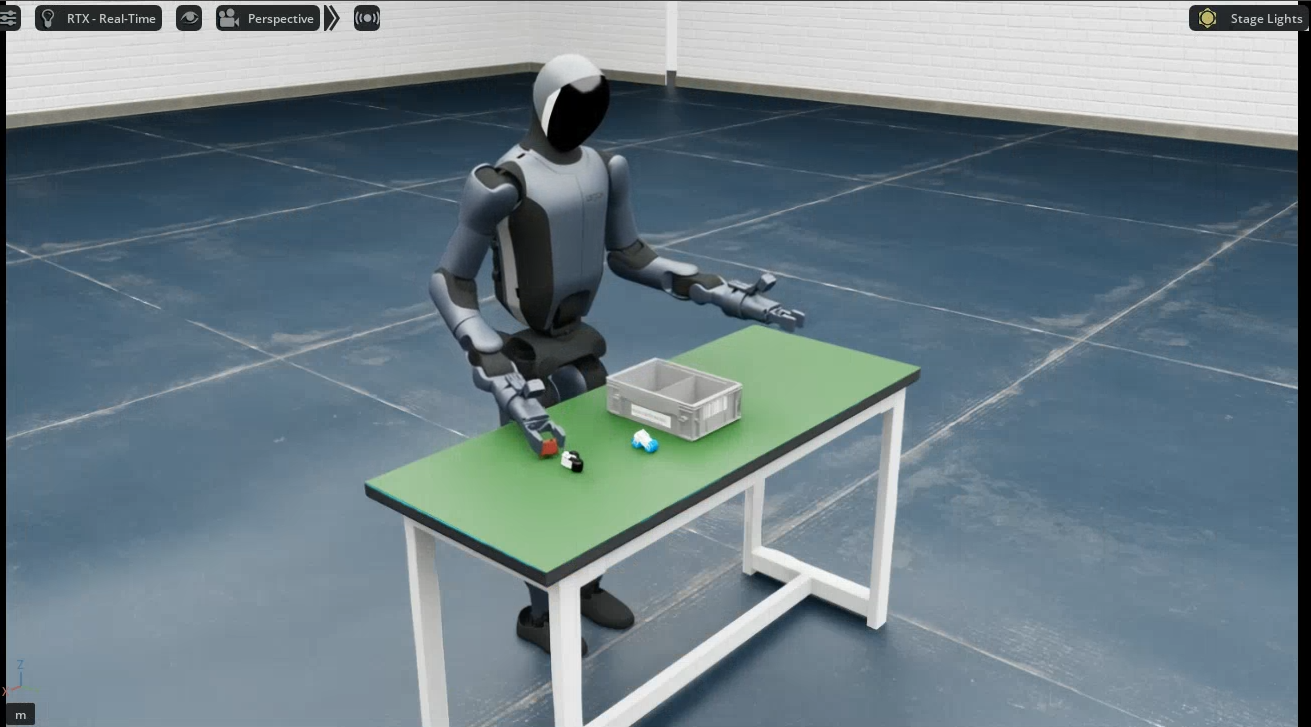
The Walker S2 EDU simulation is built on NVIDIA Isaac Sim (Isaac Lab 2.2.0). A ROS2-ZMQ bridge publishes simulation state and images on exactly the same ROS 2 topics as the real robot, enabling sim-to-real consistent teleoperation and data collection. The whole environment runs in a Docker container.
Quick start
1. Build the environment (host)
The container build is identical for all robots; see Simulation Platform · Container Setup (build / start / init / check / bash).
⚠️ Must be changed before building: edit
interfaceWhiteListinubt_sim/docker/fastdds_no_shm.xmland set<address>to192.168.11.99(the Walker S2 direct-link subnet). The file is copied into the image at build time; changes after the build have no effect.
2. Launch simulation (container)
bash run.sh bash                       # enter the container (ROS 2 + Walker SDK environment sourced automatically)
UBT_SIM_TASK=UBTSim-WalkerS2-PickPart-v0 bash /ubt_sim/scripts/start_sim.sh   # start simulation + bridge
Select the task scene with UBT_SIM_TASK.
| Task ID | Scene | Description |
|---|---|---|
UBTSim-WalkerS2-PartSorting-v0 |
Part sorting | 4 parts + bins (default) |
UBTSim-WalkerS2-PickPart-v0 |
Part sorting | Single-part picking: only one part on the table, used with pick_part.py |
Demo (pick-and-place):
- Press
Rto reset the robot/scene; the collection script can also publish/sim/cmd_resetwith--reset-scene. - When the simulation window closes, the exit trap in
start_sim.shstops the bridge automatically.
Common environment variables/arguments (combinable):
| Variable | Purpose | Default |
|---|---|---|
UBT_SIM_TASK |
Task name (also determines the robot type) | UBTSim-TienkungPro-Parlor-v0; see the task table for Walker S2 EDU |
--headless |
Run without a window | Common on headless servers |
--perf_stats |
Print performance statistics | Frame-rate debugging |
--device cpu\|cuda\|cuda:N |
Execution device | For switching GPUs outside load-only mode |
3. Data collection (container, system Python 3.10)
# Grasp a part and record
/usr/bin/python3 /ubt_sim/teleoperation/control/walker_s2/pick_part.py --save --reset-scene --robot-init

# Batch loop (400 iterations by default)
bash /ubt_sim/teleoperation/control/walker_s2/save_data.sh
pick_part.pyperforms one part pick-and-place: reads/sim/part_stateslive -> pregrasp -> grasp -> lift -> place in the bin -> return.--saveenables recording: 17 body joints + both hands + grippers + four RGB cameras and timestamps are written to HDF5 (by default only successful episodes are saved).--reset-sceneresets the scene first;--robot-initmoves the robot to its initial pose (setup actions, not recorded).save_data.shis the batch script; adjust its internal parameters per task (currently 400 single-part grasps by default).- Output:
/ubt_sim/dataset/walker_s2/<timestamp>/trajectory.hdf5.
Detailed parameters:
| Argument | Default | Description |
|---|---|---|
--part <name> |
part_a_red |
Part name (part_a_ori / part_a_red / part_b_blue / part_b_ori) |
--all-parts / --parts <name...> |
- | Grasp all four parts in order / custom order |
--side left\|right |
right |
Grasping arm |
--reset-scene |
Off | Publish /sim/cmd_reset before grasping |
--robot-init |
Off | Move to READY_POSE before grasping (equivalent to state --init) |
--randomize-parts / --no-randomize-parts |
On | Randomize part poses before multi-part grasping |
--save |
Off | Record HDF5 (with --save-only-success, only successful episodes by default) |
--capture-hz <Hz> |
15.0 |
HDF5 capture rate |
--unlock-waist |
Off | Unlock waist IK |
4. Robot controller (container, system Python 3.10)
Unified entry point walker_s2_controller.py, usable for both simulation and hardware:
# Initialize the robot pose (staged move to READY_POSE)
/usr/bin/python3 /ubt_sim/teleoperation/control/walker_s2/walker_s2_controller.py --init
# See --help for more; subcommand parameters: <subcommand> --help
Subcommands:
| Subcommand | Description | Common arguments |
|---|---|---|
state |
Joint/gripper/end-effector state, single-joint moves, ready pose, gripper control | --print-state --init --grip-open --move-joint --joint <name> --pos <rad> |
joint |
Joint/hand debugging | --print --move JOINT=ANGLE --hand-open --monitor |
endpoint |
End-effector/TCP pose test | --no-move --side left |
home |
Staged return to all-zero home + open hands | No arguments |
analyze |
Joint step/sine response analysis + CSV | --joint <name> --step <rad> --sine --listen --csv <path> |
camera |
Camera topic info/preview/save | --preview --save --count 5 --topic <topic> |
Examples:
/usr/bin/python3 walker_s2_controller.py state --print-state                # show joint/gripper/end-effector state
/usr/bin/python3 walker_s2_controller.py state --init                       # staged move to the ready pose
/usr/bin/python3 walker_s2_controller.py joint --move R_elbow_yaw_joint=0.5 # move one joint to 0.5 rad (press Enter to confirm)
/usr/bin/python3 walker_s2_controller.py home                               # staged return to all-zero home + open hands
/usr/bin/python3 walker_s2_controller.py analyze --joint R_elbow_yaw_joint --step 0.5  # joint step analysis
/usr/bin/python3 walker_s2_controller.py camera --preview                   # live camera preview
Camera test (camera subcommand)
Walker S2 EDU publishes four cameras (head stereo left/right + wrist left/right) over ZMQ (5657) and ROS 2 topics:
# Live preview (cv2.imshow, requires X11; use -X forwarding over SSH; press Q/ESC to exit)
/usr/bin/python3 /ubt_sim/teleoperation/control/walker_s2/walker_s2_controller.py camera --preview

# Inspect/save all four camera images
/usr/bin/python3 /ubt_sim/teleoperation/control/walker_s2/walker_s2_controller.py camera --save --count 5
| Argument | Default | Description |
|---|---|---|
--topic |
bridge config -> /sensor/camera/stereo/color/raw |
Camera topic to subscribe to |
--msg-type |
Image2m |
Message type (Image8k/Image512k/Image1m/Image2m/Image4m/Image6m/Image8m/sensor_msgs/Image) |
--preview |
Off | cv2.imshow live preview (Q/ESC to exit, requires X11) |
--save |
Off | Save frames as PNG (camera_frame_<timestamp>.png) |
--count <N> |
0 (unlimited) |
Maximum frames to save/preview, then exit |
--interval <seconds> |
1.0 |
Print/save loop interval |
--no-print |
Off | Suppress frame info (all modes) |
5. Dataset preview and playback (container)
Reads dataset/walker_s2/<timestamp>/trajectory.hdf5, previews cameras + joint curves (Rerun), or replays recorded actions on simulation/hardware topics.
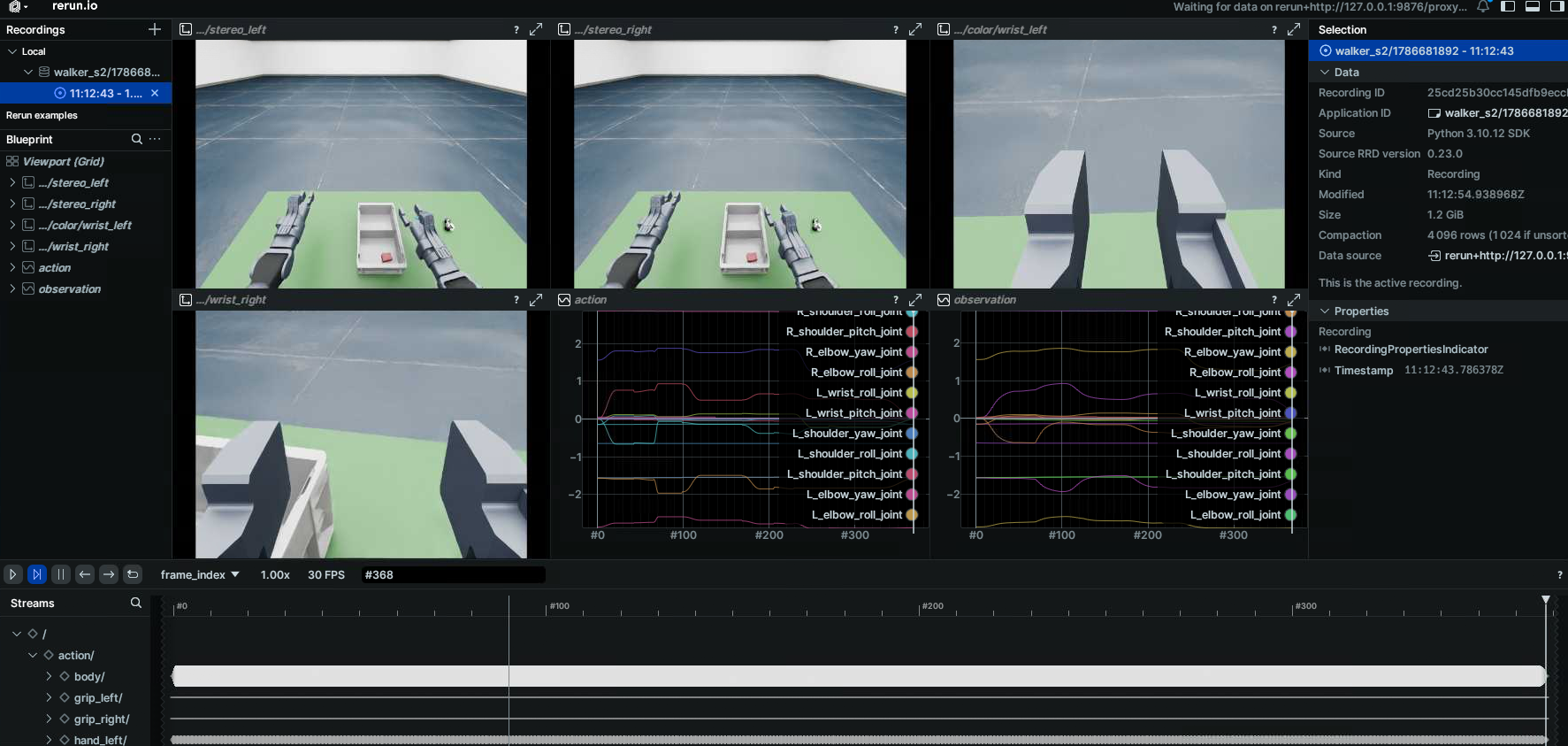
# Preview an HDF5 dataset
/usr/bin/python3 /ubt_sim/teleoperation/tools/playback_walker_s2.py \
    --episode dataset/walker_s2/1786681892 --mode preview --web-port 9090

# Action playback (simulation/hardware)
/usr/bin/python3 /ubt_sim/teleoperation/tools/playback_walker_s2.py \
    --episode dataset/walker_s2/1786681892 --mode control
See Playback for all options and safety notes.
Simulation modules
| Module | Path | Description |
|---|---|---|
| Docker orchestration | ubt_sim/docker/run.sh |
Image build, container lifecycle, bridge start/stop |
| Environment variables | ubt_sim/docker/env.sh |
Container name, image, ROS_DOMAIN_ID |
| Simulation launcher | ubt_sim/scripts/start_sim.sh |
Detects the robot from UBT_SIM_TASK and starts the bridge |
| Task definitions | ubt_sim/source/ubt_sim/task/walker_*/ |
Walker S2 scene definitions |
| Simulation config | ubt_sim/config/walker_s2/ |
part_sorting.yaml / pick-part.yaml / parlor.yaml |
| ROS2-ZMQ bridge | ubt_sim/teleoperation/bridges/walker_s2/ |
Bridge script + walker_s2_bridge_config.yaml |
| Teleoperation and collection | ubt_sim/teleoperation/control/walker_s2/ |
walker_s2_controller.py / pick_part.py / carry_box.py / keyboard_ee_control.py / save_data.sh |
| Data output | ubt_sim/dataset/walker_s2/<timestamp>/trajectory.hdf5 |
Collected episodes |
Walker S2 EDU specifics
GPU rendering + CPU PhysX
Walker S2 EDU uses GPU rendering + CPU PhysX by default: start_sim.sh / sim_runner.py set the rendering/AppLauncher device to cuda:0 but the Isaac Lab physics/env device to cpu. This avoids a PhysX GPU tensor device mismatch triggered by get_dof_velocities() during Walker S2 articulation initialization with Isaac Sim 5.0 + Isaac Lab 2.2. Do not switch physics back to GPU by default; for experiments set UBT_SIM_WALKER_S2_PHYSICS_DEVICE=cuda:0 explicitly.
Walker SDK ROS 2 message packages
The bridge and collection scripts depend on Walker SDK ROS 2 messages (rosa_msgs / shm_msgs / mc_task_msgs / mc_state_msgs / ecat_task_msgs), built by bash run.sh init into /opt/ubt_sim/walker_sdk_ros2_msgs/install and sourced automatically by run.sh bash. The DDS middleware is rmw_cyclonedds_cpp.
Troubleshooting
bash run.sh checkreports errors: follow the prompt and rerunbash run.sh init; verifynumpy<2,bodyctrl_msgs, and the Walker SDK ROS 2 messages.- Collection script fails to import rclpy / message types: use
/usr/bin/python3, not Isaac Sim Python, and confirmbash run.sh initbuilt the message packages. save_data.shtrips the consecutive-failure breaker: usually the bridge is not ready. Verify the simulation window is running and the bridge process exists (pgrep -f walker_s2_ros2_zmq_bridge), or runbash run.sh bridge-startseparately.- Simulation reports "Walker SDK messages not built": run
cd /ubt_sim/docker && bash run.sh initinside the container. - X11 unavailable / no simulation window: run
xhost +on the host and verifyDISPLAYis forwarded; on headless machines onlyUBT_SIM_LOAD_ONLY=1preview is available. - Keyboard teleoperation cannot capture input: pynput does not work in headless containers; run
keyboard_ee_control.pyon the host with a graphical session.
After collection, continue with Imitation Learning Platform.