Walker S2 EDU: Real-Robot Deployment (Rollout)¶
Deployment script:
ubt_IL/scripts/deploy/walker_s2/rollout.sh, shared by simulation and real-robot deployment (differences are described in the workflow pages). This page covers all parameters, safety prechecks, and online evaluation.
Prerequisites¶
- The robot is powered, standing, and in developer mode.
- Startup sequence: power on, enable servos and press
Dto start internal motion control -> place the robot on the ground, holdAto enter standing mode. See the Walker S2 EDU development guide for remote details. - Walker real deployment runs on the robot Vision board; copy the project and model there, then build and start the container. The build script detects the board and builds the corresponding ARM container.
Deployment matrix¶
| Scenario | Key command |
|---|---|
| 19D simulation model -> 19D PGC gripper hardware | ROBOT_MODEL=walker_s2_19d |
| 10D simulation model -> real deployment (act_async) | ROBOT_MODEL=walker_s2_10d INFERENCE_TYPE=act_async |
| Simulation feedback validation | ZMQ_HOST=127.0.0.1 (start the simulation task and bridge first) |
| Long-running deployment | Use the inference server (no cold start) |
Deployment steps (real robot)¶
# 0. Enter developer mode -- ubt container on the robot control PC
ssh -p 2222 ubt@192.168.11.2    # password: Ubtubt@9880
# Request developer mode: true to enter, false to exit
ros2 service call /sys/task/developer_mode std_srvs/srv/SetBool "{data: true}"
# true = developer mode, false = normal mode
ros2 topic echo /sys/state/walker_mode

# 1. Build and start the inference container -- robot Vision board
# 1.1 Copy the project (code + models) to the Vision board
scp project-code-and-models /home/walker/
# 1.2 Log in to the Vision board and build the container
ssh walker@192.168.11.3          # password: aa
cd project-path/ubt_IL/docker
bash run.sh build
# 1.3 Start the container
bash run.sh start
bash run.sh bash

# 2. Initialize the pose (raise the arm above the table; use --home to return to zero)
bash /ubt_IL/scripts/deploy/walker_s2/robot_ready.sh

# 3. Deploy the real-robot 10D model with asynchronous inference
ROBOT_MODEL=walker_s2_10d \
POLICY_PATH=/ubt_IL/model/walker_pick_part_real_10d_2RGB_act/checkpoints/080000/pretrained_model \
INFERENCE_TYPE=act_async INFERENCE_HZ=1 \
FPS=13 DURATION=60 \
bash /ubt_IL/scripts/deploy/walker_s2/rollout.sh

# 4. (Optional) Verify the camera path; specify camera topic/robot config
/usr/bin/python3 scripts/deploy/walker_s2/preview_camera.py --robot walker_s2_10d
Know the two machines: - Jetson
192.168.11.3(SSHwalker, passwordaa): runs thelerobot-tienkungcontainer and inference. - Robot control PC192.168.11.2(SSHubt, port 2222): developer mode / ROS 2. It does not run the inference container.
Demo¶
Initialize / home (robot_ready.sh)¶
| Command | Purpose |
|---|---|
robot_ready.sh |
Ready pose (--init, three safe stages, 13 s by default) |
robot_ready.sh --home |
Return to zero (three stages, 15 s by default); use after inference |
robot_ready.sh --legacy-init / --legacy-home |
Fall back to the old four-stage flow |
| Other arguments | Passed through to robot_control.py (e.g. --init-duration 20) |
Safety precheck¶
Deployment runs an action dimension precheck: policy output_features.action.shape[0] must match robot config action_order; otherwise deployment is refused.
ROBOT_MODELmust match the training DOF (see below).- If the policy has no action names, set
ALLOW_DIM_ONLY_POLICY=1(enabled by default).
Environment variables¶
| Variable | Default | Description |
|---|---|---|
POLICY_PATH |
Required, no default | Checkpoint directory (containing config.json) |
ROBOT_MODEL |
walker_s2_31d |
ROBOT_MODELS registry key (see below) |
ROBOT_CONFIG |
configs/<ROBOT_MODEL>.json |
Full path to the robot config (override for custom configs) |
ALLOW_DIM_ONLY_POLICY |
1 |
Allow dimension-only matching when the policy has no action names |
STRATEGY |
base |
Rollout strategy |
FPS |
13 |
Control rate |
DURATION |
30 |
Run time (seconds) |
TASK |
walker s2 rollout |
Task description |
PREVIEW_CAMERA |
1 |
Show the camera preview window |
RECORD_ACTIONS |
1 |
Record rollout actions (RECORD_OUTPUT_DIR sets the output) |
INFERENCE_TYPE |
sync |
Inference engine (sync / act_async) |
INFERENCE_HZ |
0.6 |
act_async replanning rate |
EXECUTION_HORIZON |
0 |
Truncate chunks after N steps (0 = no truncation) |
ZMQ_HOST |
127.0.0.1 |
Bridge address (local for simulation feedback; robot IP for cross-machine deployment) |
Exported parameters:
BLEND_HORIZON=10,BODY_PUBLISH_HZ=300,BODY_V_MAX=2.0(bridge chunk blending and publish rate limiting).
Robot configuration (ROBOT_MODELS registry)¶
| Registry key | Dimension | End effector | Config file |
|---|---|---|---|
walker_s2_10d |
10D (right arm 7 + head 2 + right gripper 1) | PGC right gripper | walker_s2_gripper_19d.json (10D is a subset) |
walker_s2_19d |
19D (17 body + 2 grippers) | PGC 1-DOF gripper | walker_s2_gripper_19d.json |
walker_s2_31d |
31D (17 body + 14 hands) | V4 dexterous hand 7 DOF | walker_s2_v4_hand_31d.json |
Online evaluation (recording inference trajectories)¶
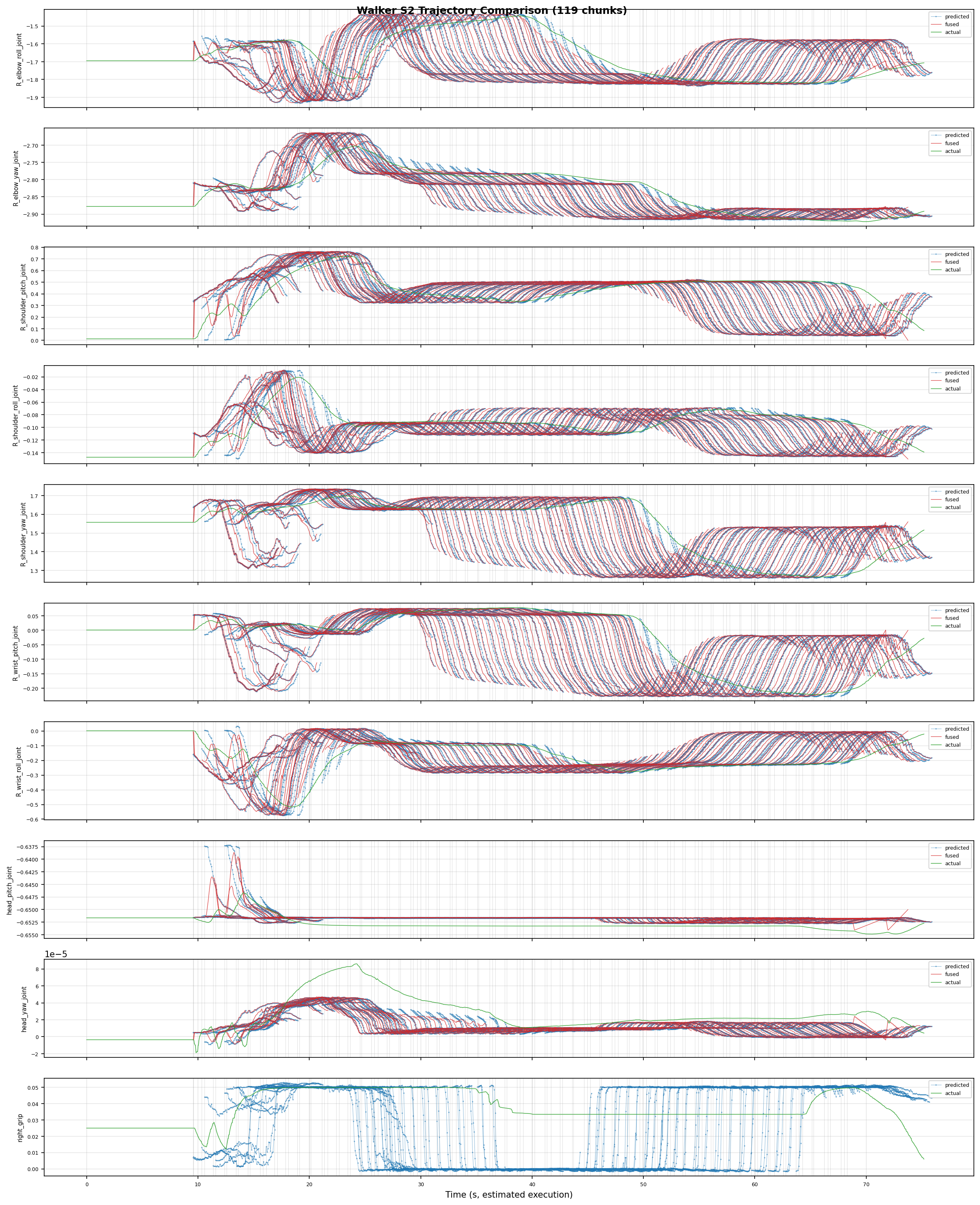
RECORD_ACTIONS=1 (enabled by default) records rollout actions for analyzing model predictions, robot execution, and ACT blending. Records are saved under ubt_IL/scripts/deploy/output.
Offline policy evaluation¶
Run the offline MSE evaluation (ubt_IL/scripts/eval/eval_policy.py, shared with TienKung) before deployment; see Imitation Learning Platform §6.
Inference server (warm start)¶
For long-running or multi-task deployment, use the inference server to avoid a cold start (verified on hardware 2026-08-09: ~6 s warm-up to READY; start/stop/home/shutdown all pass). It supports start/stop/home/status/shutdown, model hot-swap with load, and remote launch. See Inference server.
start/home/shutdownmove the robot; execute them next to the robot.
FAQ¶
| Symptom | Fix |
|---|---|
| Deployment reports a dimension mismatch | Safety precheck refused: match ROBOT_MODEL to the policy dimension (10D -> walker_s2_10d, 19D -> walker_s2_19d, 31D -> walker_s2_31d) |
| Robot does not move | On hardware, confirm Bridge2 is running (5561/5562), the camera relay is running (5563), and developer mode is active; in simulation confirm ZMQ_HOST=127.0.0.1 and the simulation task is running |
Inference server start fails |
start/stop require INFERENCE_TYPE=act_async; the sync engine has no pause/resume semantics |
launch --remote fails |
Confirm --host is the Jetson 192.168.11.3 (SSH walker), not the control PC; the SSH user needs sudo docker exec permission |
| Repeated inference server launch fails | The singleton PID file /tmp/walker_inference_server.pid exists; shutdown cleanly or remove it manually |
| Simulation and hardware camera sizes differ | Simulation RGB is [3,240,320] (10D) or [3,480,640] (33D); hardware is [256,320] etc. Model input must match the training data — do not mix them |