Walker TienKung Dex Simulation Workflow: Collect -> Convert -> Train -> Evaluate -> Deploy
Robot: Walker TienKung Dex — right arm 7 + right hand 13 (Inspire) Data source: Isaac Sim collection (
ubt_sim, taskUBTSim-TienkungDex-Parlor-v0) Container:lerobot-tienkung(built/started byubt_IL/docker/run.sh, project mounted at/ubt_IL)
Contents
- 0. Workflow overview
- 1. Prerequisite: simulation collection (ubt_sim)
- 2. Start the container (ubt_IL)
- 3. Data conversion (HDF5 -> LeRobot)
- 3.1 Conversion command
- 3.2 Data visualization
- 3.3 Stationary-frame trimming (TRIM_STATIONARY, off by default)
- 4. Policy training
- 5. Policy evaluation (offline MSE)
- 6. Model deployment (simulation)
- 7. FAQ
0. Workflow overview
ubt_sim collection (trajectory.hdf5)
      │  right arm 7 + right hand 13 (other dimensions are constant and dropped)
      ▼
scripts/convert/tienkung_dex/convert.sh  ──► dataset/tienkung_dex_sim_pick_apple (20 episodes / 20D / 15 fps)
      ▼
scripts/train/tienkung_dex/train.sh      ──► model/tienkung_dex_sim_pick_apple_act
      ▼
scripts/eval/eval_policy.py              ──► offline MSE + per-dimension curves
      ▼
robot_ready.sh → rollout.sh              ──► feedback into simulation, judge success
Two constraints to remember:
- Keep only effective dimensions in the action space. The left arm / waist / head / legs have a range ≤ 0.007 rad in the data (dead dimensions); including them breaks QUANTILES normalization (
NaN/Infruins training). The current conversion config excludes them. - Move the robot to the ready pose before deployment (
robot_ready.sh); otherwise the initial pose mismatch may cause a collision with the table.
1. Prerequisite: simulation collection (ubt_sim)
See Simulation Platform for the environment, task scenes, reset, and playback.
# ① Launch simulation inside the ubt_sim container (with the task name)
cd ubt_sim
UBT_SIM_TASK=UBTSim-TienkungDex-Parlor-v0 bash scripts/start_sim.sh

# ② Collect data
bash teleoperation/control/tienkung_dex/save_data.sh --batch 20         # 20 episodes
Output: ubt_sim/dataset/tienkung_dex/<epoch>/trajectory.hdf5, with attributes for joint names / fps / hand variant / task.
With 20 collected episodes, jump directly to section 3.
2. Start the container (ubt_IL)
cd ubt_IL/docker
bash run.sh build      # first time
bash run.sh start
bash run.sh check      # expect [OK] for "tienkung_dex plugin / bridge / ROS2 msgs"
bash run.sh bash
3. Data conversion (HDF5 -> LeRobot)
ubt_sim/is mounted read-only at/ubt_simbydocker/run.sh; convert directly inside the container. Ifls /ubt_simfails, the container was created with an old mount; rebuild withbash run.sh rm && bash run.sh start.SRC_ROOTis optional: when the defaultubt_IL/dataset/tienkung_dexdoes not exist,convert.shfalls back to/ubt_sim/dataset/tienkung_dex.
3.1 Conversion command
cd /ubt_IL

# Convert one episode first to validate the pipeline
SRC_ROOT=/ubt_sim/dataset/tienkung_dex \
bash /ubt_IL/scripts/convert/tienkung_dex/convert.sh --save_one true --overwrite

# Then convert everything
SRC_ROOT=/ubt_sim/dataset/tienkung_dex \
bash /ubt_IL/scripts/convert/tienkung_dex/convert.sh --overwrite
Defaults: CONFIG=configs/tienkung_dex_20d_1RGB_inspire.json, REPO_ID=tienkung_dex_sim_pick_apple, FPS=15, HDF5_REL_PATH=trajectory.hdf5, ROBOT_TYPE=tienkung_dex.
On the simulation side, the Inspire hand records the 13 hand joints of the hardware channel driver, while the BrainCo hand uses 6 joint values. Output is written to /ubt_IL/dataset/tienkung_dex_sim_pick_apple/.
Validation:
python - <<'PY'
import json
info = json.load(open("/ubt_IL/dataset/tienkung_dex_sim_pick_apple/meta/info.json"))
print(info["total_episodes"], info["features"]["observation.state"]["shape"],
      info["features"]["observation.images.head"]["shape"])
PY
Expected output: 20 [20] [3, 360, 640] (the episode count depends on how much data was collected).
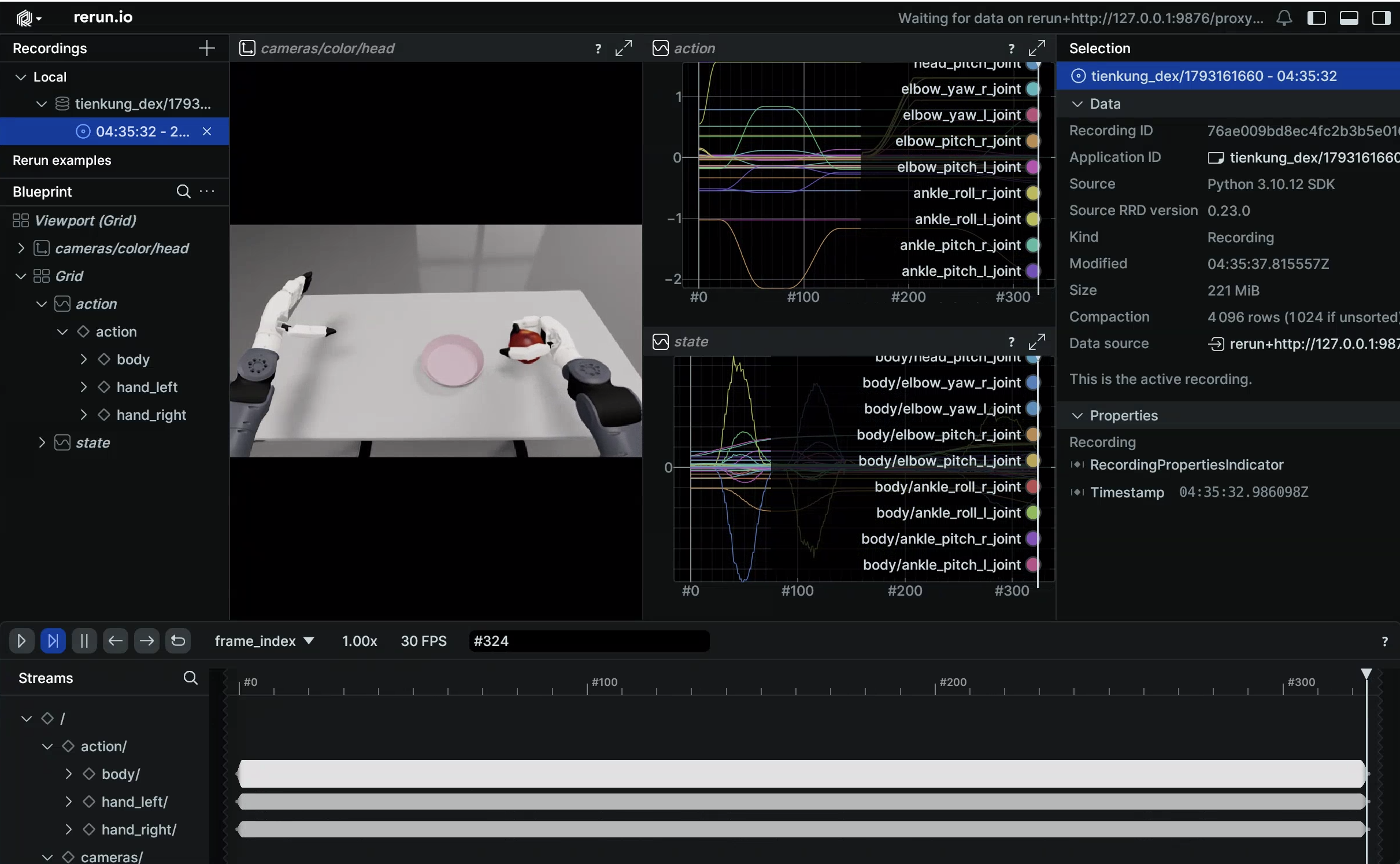
3.2 Data visualization
--episode-index is required (one episode at a time; choose 0~19 for 20 episodes):
# Inside the container, open the rerun window directly (the container needs X access with DISPLAY set)
HF_HUB_OFFLINE=1 lerobot-dataset-viz \
  --repo-id tienkung_dex_sim_pick_apple \
  --episode-index 0 \
  --root /ubt_IL/dataset/tienkung_dex_sim_pick_apple
3.3 Stationary-frame trimming (TRIM_STATIONARY, off by default)
Stationary-frame trimming prevents long stationary actions from trapping the policy in a local stationary loop. convert.sh exposes all --stationary-* options. Measurements on 20 episodes from Oct 2026 (STATIONARY_DIAGNOSE=1):
| Metric | Value |
|---|---|
| Leading stationary run | 0 frames (recording starts from the ready pose) |
| Trailing stationary run | mean 13 frames / max 14 |
| In-segment stationary runs | 160 runs across 20 episodes; mean 23 frames, max 56; 120 runs ≥10 frames |
| Frames classified as stationary | 36%–39% |
Actual effect of enabling trimming with defaults (thr=0.03, W=5, cap=8):
- 10,937 frames -> 8,269 frames (-24.4%), 411–416 frames per episode (originally 539–563).
- No motion lost: all 20D ranges preserved; the maximum per-frame step matches the raw data (hands identical, arms at most +0.0056 rad).
- Hand-closing motion is not trimmed: fingers close over 4.5 s, moving about 0.075 within a 5-frame window (threshold 0.03), so it is classified as motion.
Still disabled by default. Note: stationary trimming only handles "long stationary runs" and cannot fix adjacent duplicate frames (15 Hz recording runs on an ~11 Hz simulation loop, so duplicates are spread across the whole motion) — that is a sampling-rate issue, not a pause issue.
Tuning order: run STATIONARY_DIAGNOSE=1 to inspect the distribution first, then decide whether to enable it; STATIONARY_CAP / STATIONARY_THRESH are the two most frequently changed parameters.
4. Policy training
# Default config: 20 episodes / 20D / 60000 steps / checkpoint every 10000
bash /ubt_IL/scripts/train/tienkung_dex/train.sh

# Override common parameters
OUTPUT_DIR=/ubt_IL/model/tienkung_dex_sim_pick_apple_act_v2 \
STEPS=50000 SAVE_FREQ=10000 BATCH_SIZE=16 bash /ubt_IL/scripts/train/tienkung_dex/train.sh

# Resume (CONFIG_PATH points to train_config.json inside the checkpoint)
CONFIG_PATH=/ubt_IL/model/tienkung_dex_sim_pick_apple_act/checkpoints/last/pretrained_model/train_config.json \
RESUME=true bash /ubt_IL/scripts/train/tienkung_dex/train.sh
| Environment variable | Default |
|---|---|
CONFIG_PATH |
configs/train_config_tienkung_dex_sim_pick_apple.json |
OUTPUT_DIR |
/ubt_IL/model/tienkung_dex_sim_pick_apple_act |
STEPS / SAVE_FREQ |
60000 / 10000 |
BATCH_SIZE |
Value from the config (16) |
RESUME |
false |
WANDB_ENABLE |
false |
Output: checkpoints/<step>/pretrained_model (with config.json + model.safetensors) + checkpoints/last.
20 episodes are about 8.3k frames; 60k steps at batch 16 is ≈ 116 epochs, far beyond typical training. This is a "rather long than short" strategy: save every 10k steps (10k/20k/30k/40k/50k/60k, six checkpoints) and pick the best by offline MSE + simulation feedback. To reduce overfitting risk,
STEPS=15000(≈29 epochs) is enough.
5. Policy evaluation (offline MSE)
/lerobot/.venv/bin/python /ubt_IL/scripts/eval/eval_policy.py \
  --policy-path /ubt_IL/model/tienkung_dex_sim_pick_apple_act/checkpoints/last/pretrained_model \
  --dataset-path /ubt_IL/dataset/tienkung_dex_sim_pick_apple \
  --episodes 5 --inference-freq 1 --plot \
  --plot-dir /ubt_IL/scripts/eval/output/eval_tienkung_dex_sim_pick_apple_act \
  --output /ubt_IL/scripts/eval/output/eval_tienkung_dex_sim_pick_apple_act/results.json \
  --device cuda
--inference-freq 1 means step-by-step inference, closest to deployment behavior; the default queues by n_action_steps.
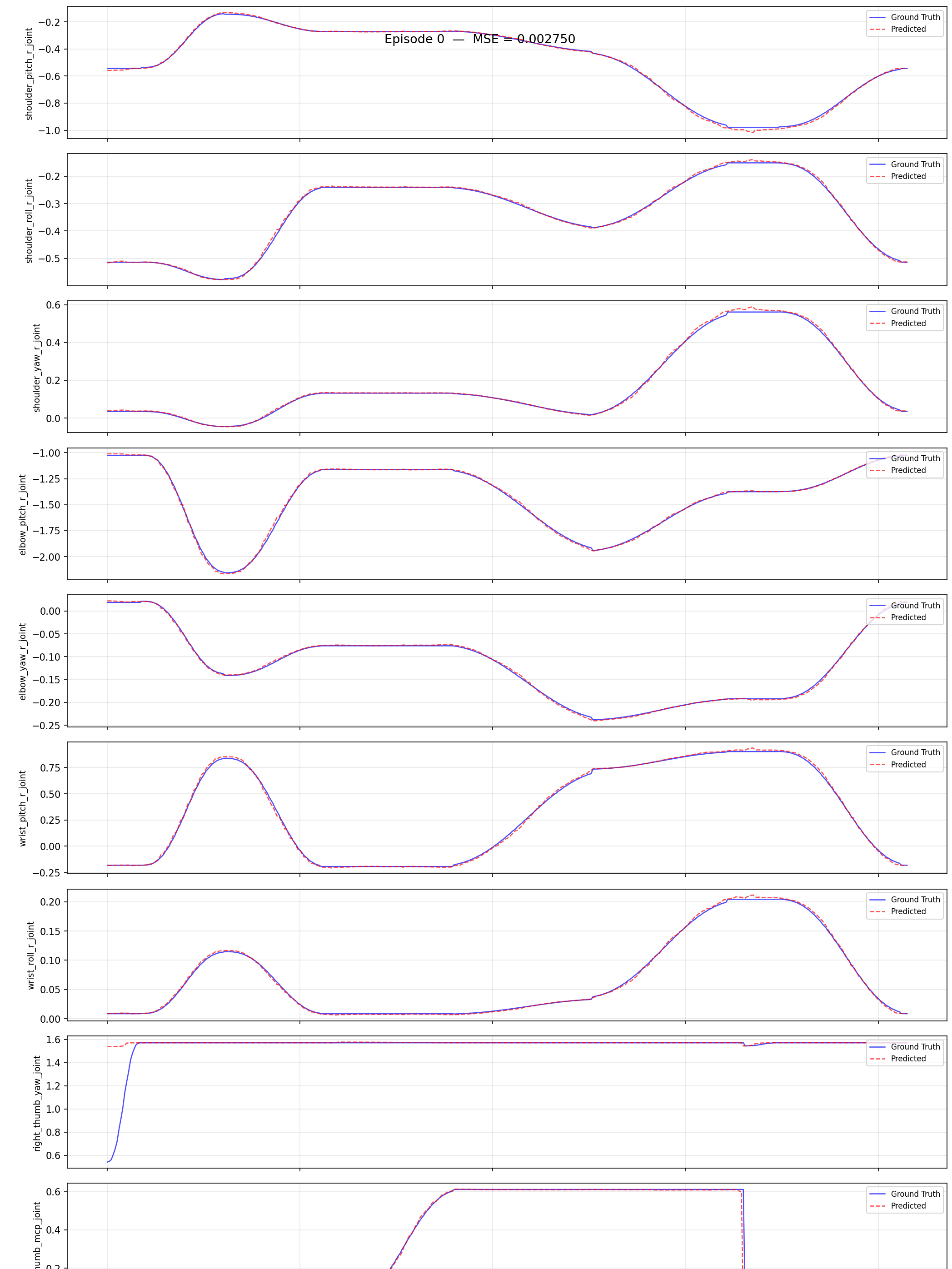
Example output (020000 checkpoint, episode 0, prediction vs ground truth):
Comparison of two checkpoints (5 episodes / --inference-freq 1):
| Checkpoint | Mean MSE (5 episodes) | Episode 0 |
|---|---|---|
| 010000 | 0.003661 | 0.003219 |
| 020000 | 0.002130 | 0.002750 |
This simulation deployment used 020000. Offline MSE is computed on the training set; a low absolute value does not guarantee closed-loop success — it only ranks checkpoints from the same run. The final criterion is /sim/task_completed after feedback deployment.
Check: in the 20D per-dimension curves, hand dimensions should not be flat all the way; otherwise the conversion columns are likely mis-sliced or the model did not learn the hand.
6. Model deployment (simulation)
# ① Inside the ubt_sim container: start simulation (separate terminal)
cd ubt_sim
UBT_SIM_TASK=UBTSim-TienkungDex-Parlor-v0 bash scripts/start_sim.sh

# ② Inside the inference container: move to the ready pose (four stages + hand pose), check the camera view, and confirm ROS_DOMAIN_ID
bash /ubt_IL/scripts/deploy/tienkung_dex/robot_ready.sh
/usr/bin/python3 /ubt_IL/scripts/deploy/tienkung_dex/preview_camera.py

# ③ Run the policy
POLICY_PATH=/ubt_IL/model/tienkung_dex_sim_pick_apple_act/checkpoints/last/pretrained_model \
JOINT_CONFIG=tienkung_dex_20 FPS=15 DURATION=60 \
bash /ubt_IL/scripts/deploy/tienkung_dex/rollout.sh

# ④ Reset the scene (robot returns HOME, not the ready pose)
/usr/bin/python3 /ubt_IL/scripts/deploy/tienkung_dex/reset.py

# ⑤ Rerun the ready pose before the next episode: after reset head_pitch returns to ~0.000, losing the training view (45° down)
bash /ubt_IL/scripts/deploy/tienkung_dex/robot_ready.sh
reset.pyonly sends/sim/cmd_resetto the simulator so the scene and robot return to their initial state; it does not restore the ready pose. For consecutive episodes, ②③⑤ form one group — do not jump from ④ straight to the next episode.
Warm-started inference service (warm up once, then start/stop in seconds):
POLICY_PATH=/ubt_IL/model/tienkung_dex_sim_pick_apple_act/checkpoints/last/pretrained_model \
JOINT_CONFIG=tienkung_dex_20 FPS=15 \
bash /ubt_IL/scripts/deploy/tienkung_dex/inference_server.sh

bash /ubt_IL/scripts/deploy/tienkung_dex/inference_client.sh status
bash /ubt_IL/scripts/deploy/tienkung_dex/inference_client.sh start
bash /ubt_IL/scripts/deploy/tienkung_dex/inference_client.sh stop
bash /ubt_IL/scripts/deploy/tienkung_dex/inference_client.sh shutdown
Success criterion: /sim/task_completed error < 0.15 m, with at least 3 of 5 episodes successful.
Demo:
Control rate
The dataset is 15 Hz and the simulation loop runs at about 11 Hz (RTF≈0.11). Start with FPS=15 and monitor the actual publish rate printed by rollout and the /robot_state rate; if the actual rate is far below 15, the same motion is stretched on the simulation timeline (the arm appears to lag), and you can adjust FPS then — keep the dataset at 15 Hz.
7. FAQ
| Symptom | Check |
|---|---|
robot_ready.sh reports "Bridge2 is running" |
robot_ready.py and Bridge2 both write /arm/cmd and cannot run together; stop rollout first (--force skips the check; use with care) |
| Arm does not move in simulation | Is ROS_DOMAIN_ID consistent with simulation (ubt_sim defaults to 0)? Is /robot_state publishing (ros2 topic hz /robot_state)? |
| No camera image | Is 5758 publishing a JPEG stream? Is the camera type dex_camera (not image_server)? |
| Action dimension precheck fails | JOINT_CONFIG does not match training (20 ↔ 13) |
| Hand motion globally misaligned | HAND_VARIANT does not match the physical hand; Bridge2 prints the "right-hand channel → joint" table at startup |
| Arm jumps far in one step after deployment | MAX_RELATIVE_TARGET is empty and the plugin does not limit steps; set 0.05 for simulation debugging |
| Training runs out of memory | Reduce BATCH_SIZE; close simulation first if it is occupying GPU memory |